- Data Recovery
- Data Recovery for PC
- Data Recovery for Android
- Data Recovery for iPhone/iPad
- Unlock For Android
- Unlock for iPhone/iPad
- Android System Repair
- iPhone/iPad System Repair

Updated By Tom On Jul 22, 2026, 10:07 pm
"How to remove a Mi account if you forget your password?"
Regaining access to the device undoubtedly plays a decisive role in its normal use. As a user of Xiaomi Android smartphones, with the help of a Xiaomi account, you can freely experience a wide variety of applications and services such as the Xiaomi Store, Xiaomi Community, Xiaomi Cloud, Mi Home, and Xiaomi TV. However, if you accidentally forget your Xiaomi account and password, do you know how to deal with it? Don't worry. This article will provide you with a detailed introduction on how to unlock a password-free Xiaomi account in a short time, helping you once again enjoy the convenience and fun brought by Xiaomi devices. It mainly includes: how to skillfully bypass the Xiaomi account by resetting the password, using the Xiaomi account unlocking tool, and applying the TPS Xiaomi tool. Finally, we will also provide you with practical tips for unlocking the screen of Xiaomi using Geekersoft Android Unlocker.
For users who have forgotten their Xiaomi account passwords, Xiaomi devices offer a "Forgot Password" feature to help you regain access to your device. By using this method, you can easily embrace the wonderful experience brought by Xiaomi devices again. Regarding how to delete a Mi account without a password, resetting the password is undoubtedly the crucial first step. Resetting your password not only enables you to regain access rights but also further enhances the security of your account, safeguarding the safety of your devices and data. The steps for resetting the Mi account password are as follows.
Step 1 Use browsers such as Google Chrome, Safari, and Microsoft Edge to visit id.mi.com and enter the login page of the Xiaomi account.
Step 2 On the login screen, click "Forgot Password" to start the password reset process.
Step 3 Enter the email or phone number used to register the Mi account, and then check the email or text message to obtain the verification code. And follow the instructions in the email or text message to gradually reset your password.
The above are the steps required to reset the Mi account password to regain access. This means that you can once again fully enjoy all the powerful functions of Xiaomi devices. If this method doesn't work, there are other ways to delete the Mi account without a password, and they can also help you regain access.
As is known to all, Mi Account Unlock Tool is a practical software program officially launched by Xiaomi, which endows users with the ability to unlock Xiaomi smartphones. In addition, as an official Xiaomi tool, this tool can perfectly support all Xiaomi smartphone models available on the market. The interface of Mi Account Unlock Tool is simple and intuitive. Even if users have limited technical knowledge reserves, they can still operate it easily. Next, we will introduce in detail the specific steps for downloading, installing and using this tool to unlock your Xiaomi account:
Step 1 Click on the provided link to download and install the Mi Account Unlock Tool on your computer.
Step 2 Use a USB data cable to connect the Xiaomi device to the computer. Press and hold the "Volume Up" key and the "Power" key of the Xiaomi device simultaneously to enter the recovery mode.
Step 3 Open the Mi Account Unlock Tool on your computer and click "Unlock" as prompted. Later, the tool will automatically unlock the device for you.
Before officially starting the unlocking operation, please ensure that the battery level of the device is at least 65% to prevent any interruption during the unlocking process and ensure a smooth and unobstructed entire unlocking process.
In addition, you can also unlock the Mi account by means of other methods. For example, TPS Xiaomi Tool, this is a powerful software, specially designed to help users unlock Xiaomi devices. It is perfectly compatible with many Xiaomi models. The functions it possesses enable users to easily bypass Xiaomi account locks and FRP locks at a very low operational cost. The following are the specific steps to unlock a Xiaomi account using the TPS Xiaomi tool.
Step 1 Download and install the TPS Xiaomi tool and the USB driver required for your device.
Step 2 Turn off the device. Then, hold down the "Power" key and the "Lower Volume" key simultaneously until you see the Fastboot logo appear. Then, use a USB data cable to connect your Xiaomi device to the computer.
Step 3 Open the TPS Xiaomi Tool on your computer. And confirm that your device has been successfully identified.
Step 4 In the TPS Xiaomi Tool interface, click "Check Device Information" > "Disable Mi Account" > "Bypass Mi Account". After the process is completed, your Xiaomi phone will be successfully unlocked.
If you are troubled by forgetting the password of your Xiaomi device and thus unable to access it, we strongly recommend that you use Geekersoft Android Unlocker. This is an efficient and reliable tool for unlocking Android devices. Without a password, Geekersoft Android Unlocker can help users regain control of their phones. It can unlock various types of screen locking methods, such as PIN codes, patterns, fingerprints, etc. The Geekersoft Android Unlocker is simple, easy to use, fast and secure. Due to its first-class success rate, Geekersoft Android Unlocker has been highly praised by users.
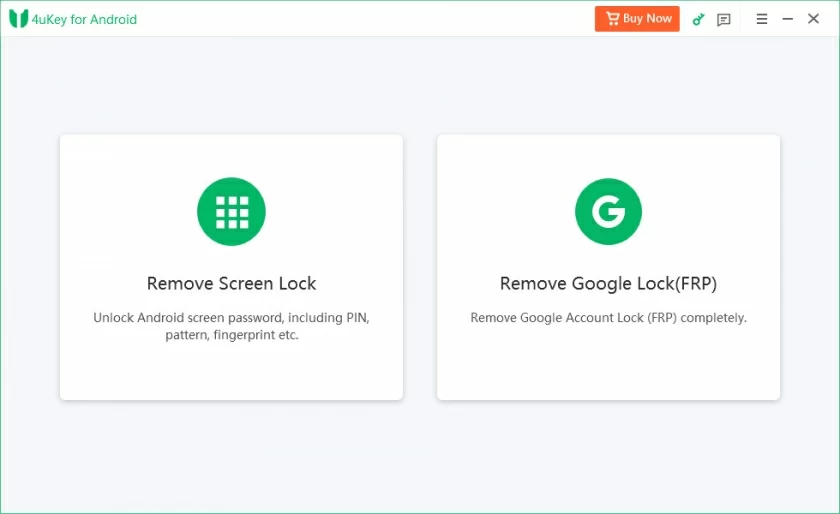
The main highlights of Geekersoft Android Unlocker:
- Unlock multiple screen locks: It can quickly remove various screen lock methods such as PIN codes, patterns, fingerprints, and facial ids.
- FRP bypass function: On supported devices, the factory reset protection (FRP) can be bypassed, which is undoubtedly a great blessing for users who have forgotten their Google account details.
- User-friendly interface: Its intuitive design can guide users step by step through the unlocking process, making the operation effortless.
- Wide device compatibility: Supports numerous Android brands, including mainstream brands such as Samsung, Xiaomi, and Huawei.
- Data protection: When unlocking certain Samsung and LG devices, it can ensure that user data will not be lost.
- Quick unlock experience: Within just a few minutes, users can regain access to the device.
- Comprehensive support and guarantee: We offer detailed troubleshooting guides and professional customer support to ensure you have no worries during the unlocking process.
- Regular update and optimization: The software is updated regularly to ensure compatibility with the latest Android versions and devices.
If you are still troubled by how to delete the screen lock of Xiaomi without a password, you might as well follow the simple steps below. Geekersoft Android Unlocker can enable you to access the device without any obstacles in just 3 steps.
Step 1 Install and start Geekersoft Android Unlocker on your computer. And connect the Xiaomi device to the computer using a USB data cable.
Step 2 In the Geekersoft Android Unlocker software, click on the "Screen Unlock" > "Unlock Android Screen" option to continue the unlocking process.
Step 3 Select your device brand, Xiaomi, and then choose "Delete without losing Data". And according to the prompts, provide detailed information such as the name and model of the device, and then click "Next" to continue the operation. Wait patiently for the Geekersoft Android Unlocker to complete the entire unlocking process. After that, you will be able to regain access to the device without losing any data.
The Mi account is the key for users to enjoy the all-round experience brought by the Xiaomi ecosystem. Many Xiaomi services and applications, such as Xiaomi Cloud, Xiaomi Home, Xiaomi TV, and Xiaomi Community, all rely heavily on and require the use of Mi accounts. This article introduces an effective method for deleting your Mi account without a password, which can help you quickly regain access to your Xiaomi device. Among them, Geekersoft Android Unlocker is an excellent choice for achieving 100% screen unlocking of Xiaomi phones on the desktop. There is no need to rely on other complex means. Just use the Geekersoft Android Unlocker for the first time on your mobile phone, and you can directly unlock the locked Android phone from the Android device end.