- Data Recovery
- Data Recovery for PC
- Data Recovery for Android
- Data Recovery for iPhone/iPad
- Unlock For Android
- Unlock for iPhone/iPad
- Android System Repair
- iPhone/iPad System Repair

Updated By Cameron On Jan 21, 2026, 9:30 pm
In today's society, smart phones have become an indispensable and important tool in People's Daily life and work. All aspects of life need the help of smart phones. If you accidentally forget the password of your Huawei phone, you will find that your life and work will be very inconvenient. In fact, Huawei devices are equipped with a series of security features designed to comprehensively protect the security of your personal information. Once you lose the screen lock password, these originally secure functions may become obstacles for you to unlock your phone. Don't worry. This guide will provide you with detailed methods, including using the built-in recovery options of your phone to leveraging third-party tools to help you unlock your Huawei phone password smoothly when you forget it.
The inability to access a Huawei phone may be caused by various software and hardware issues or external factors. The following analyzes the common causes and corresponding solutions from different dimensions:
1. Hardware failure causing inability to access: such as screen damage or malfunction, battery issues, motherboard or chip failure, etc.
2. Software or system issues: including system crashes or failed upgrades, viruses or malicious software, etc
3. External factors or human restrictions: For instance, forgetting the lock screen password, pattern lock or PIN code, and being unable to unlock; Prompted "Activate Device" but forgot the Huawei account password.
If you find that you can no longer access your phone because you forgot the lock screen password, don't panic first, because there are many ways to help you solve this problem. Among them, the most common methods mainly involve using the built-in functions of mobile phones or dedicated tools. In addition, you can also use Google's "Find My Device" and other services to remotely bypass the lock screen of your Huawei phone.
Huawei devices offer users some built-in practical functions that can help you regain device access without losing data. For instance, by verifying whether the password has been changed and checking other related functions, it might be possible to avoid resorting to more radical solutions such as restoring factory Settings. You can check them one by one according to the following prompts.
1. Confirm whether the password has been changed
One common reason why a Huawei phone is locked is that its password is accidentally changed. You can carefully recall whether you have changed the screen lock password recently. At the same time, check if anyone else has access to your phone and changed the password. Sometimes, unexpected input errors, auto-correction changes, or saved password updates can all lead to confusion.
2. Check whether the "PrivateSpace" function is enabled
The "PrivateSpace" feature of Huawei devices enables users to create an independent and secure space on their devices. When you find that the device is suddenly locked, it's possible that this function has been activated. At this point, try entering the password of "PrivateSpace" to unlock the device. If you forget this password, you can refer to Huawei's official reset guide for operation. Alternatively, when you restart the device, the system will default to "MainSpace".
3. Check whether the multi-user mode has been activated
Huawei mobile phones support the creation of multiple user profiles for device use. When the device is under another user's profile, the password of the main account will not unlock the device. This situation usually occurs when the device is manually switched or automatically switches to guest or secondary user mode after a restart. At this point, you can place the personal profile icon at the bottom of the lock screen and click it to switch back to your main account.
If the lock screen problem cannot be solved through conventional troubleshooting methods, it might be worth trying more advanced solutions. A third-party tool specifically designed for users who have forgotten their passwords, it can bypass the lock screen restriction in an efficient way. Among them, the Geekersoft Android Unlocker is the preferred solution for unlocking Huawei phones without a password. Its core advantages are as follows:
1. Full coverage of all types of lock screens: It can delete various screen locking methods such as PIN codes, digital passwords, pattern locks and fingerprint locks with one click. Through a minimalist step-by-step operation process, even users without a technical background can easily get started. When you sigh, "What should I do if I forget the password of my Huawei phone?", this tool can precisely address the pain point.
2. Secure unlocking mechanism: Different from traditional brute-force unlocking, its technical principle focuses on bypassing lock screen verification while minimizing the risk of device damage to the lowest level, ensuring data security and hardware integrity to the greatest extent.
3. Wide compatibility: It not only supports all series of Huawei models, but also covers other Android brand devices such as Xiaomi, and can simultaneously bypass FRP lock (Factory Reset Protection).
If you want to know how to unlock a Huawei phone without a password using Geekersoft Android Unlocker, please follow the quick steps below.Step 1 Install and run Geekersoft Android Unlocker on your computer, and connect the locked phone to the computer system using a USB data cable. In the software interface, click "Screen Unlock" > "Android" > "Unlock Android Screen".
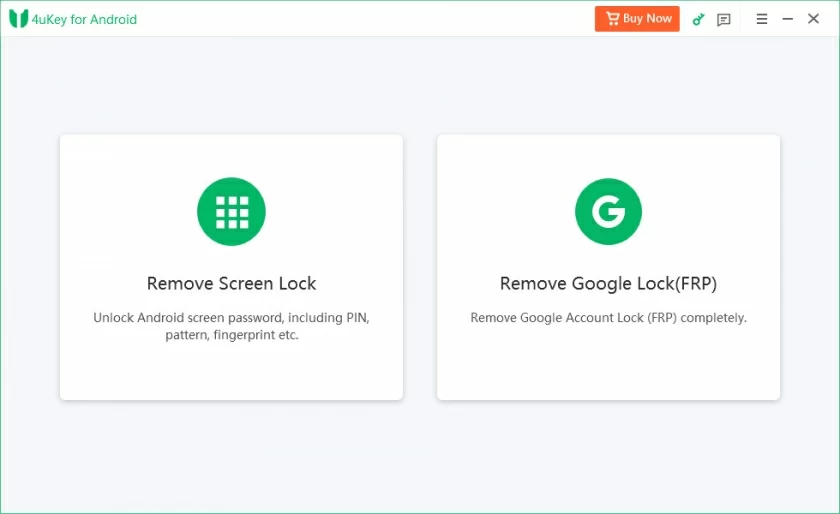
Step 2 After selecting "Huawei" from the brand list, follow the prompts to enable the recovery mode based on your phone model and continue the operation.
Step 3 The Geekersoft Android Unlocker will automatically initiate the operation to unlock your phone for you. Just wait for a moment. The software will successfully unlock the screen, allowing you to regain full access to the device.
When you forget the lock screen password of your Huawei phone, you can easily solve the problem through remote operation by using the Google search function. Google Find Device can not only be used for location and tracking when the mobile phone is lost, but also has the function of erasing the data of Android devices to protect privacy and security. This operation will clear all data on your phone. Please use it with caution. If the "Find My Devices" function was not enabled on your phone before, this method will not work. To bypass the lock screen limit, you can remotely reset your phone by following these steps:
Step 1 Open a browser on your other device (such as a computer or tablet), visit the Google Find My Device website, and log in with the Google account associated with the locked Huawei phone. After a successful login, the page will redirect to the map interface, displaying the device location information.
Step 2 In the map interface, find the left panel, select the "Restore Factory Settings Device" option, and click "Next". To ensure operational safety, the system will require verification of your identity. Once the verification is completed, the reset procedure can be initiated.
Huawei Cloud Services also offer convenient remote device management functions. By using its "Find Device" option, mobile phone location and data erasure can be achieved, thereby bypassing the lock screen. This method will result in the loss of all mobile phone data. If you have important data, please try other backup methods in advance. In addition, if the Huawei account information is forgotten or the device is not bound to Huawei Cloud, this method will not take effect. This method is similar in principle to Google's search function, but it requires a Huawei account to operate. The specific steps are as follows:
Step 1 Open the official website of Huawei Cloud in a browser and log in with the Huawei ID bound to the locked phone. After logging in, click on the "Find Device" option in the menu, and the page will display a list of all associated devices.
Step 2 Select the target Huawei phone from the device list and click the "Delete Data" option. Finally, confirm the erasure operation. Once completed, you can regain access to the device.
To bypass the screen lock, performing a hard reset operation on the device and erasing all data is a feasible approach. This method uses the Recovery Mode to restore the device to the original software configuration state, that is, the state without setting a password. However, it should be noted that after the reset is completed, the phone will trigger the FRP lock. If you forget the password of your Huawei phone, you can follow the steps below.
Step 1 Turn off your phone. Then, press the "Power" button and the "Volume Up" button simultaneously. After the Huawei logo appears on the screen, release these two buttons.
Step 2 After successfully activating the recovery mode, release the volume keys and use them to select the "Erase Data/Restore Factory Settings" option. On the subsequent screen that appears, select "Erase Data/Restore Factory Settings" again, and then press the "Power" button to confirm the operation.
The above are several methods for unlocking a Huawei smartphone that we have introduced to you. This includes everything from using Google's "Find My Device" feature to leveraging the recovery mode, as well as using Geekersoft Android Unlocker, etc. All these methods can help you regain access to your mobile phone. Although each solution has its own advantages and disadvantages, among them, the Geekersoft Android Unlocker offers a fast and reliable unlocking solution that can help you easily unlock your Huawei phone. This tool is easy to operate and can bypass forgotten passwords in a safe and direct way.