- Data Recovery
- Data Recovery for PC
- Data Recovery for Android
- Data Recovery for iPhone/iPad
- Unlock For Android
- Unlock for iPhone/iPad
- Android System Repair
- iPhone/iPad System Repair

Updated By Soha On Jun 5, 2026, 11:18 pm
"I forgot the pattern password. How can I unlock the Mi pattern lock on my Xiaomi phone?"
Xiaomi mobile phones (such as Redmi 9, Redmi Note 9 Pro, etc.) are widely popular for their high cost performance and strong performance. However, users may inevitably forget the Mi pattern due to long-term non-use or accidental operation. If your Xiaomi phone can't be unlocked because you forget the pattern lock, don't worry! The following are practical methods to unlock without a password, helping you regain device access without losing data.
If you have set a pattern lock on your Xiaomi phone, it is undoubtedly an important measure to prevent others from accessing the phone without authorization. However, people are always negligent at times. Forgetting the password they set themselves is also a common occurrence. Don't worry! The Geekersoft Android Unlocker can help you easily solve the MI pattern lock problem. This application is easy to operate and is specially designed to help users bypass the lock screen of Android devices (including Xiaomi phones).
The Geekersoft Android Unlocker function is powerful and features advanced characteristics. It can help you remove various lock screen methods such as PIN codes, passwords, and fingerprints. It is compatible with multiple Android brands, ensuring that you unlock your Xiaomi phone quickly and safely. With just three simple steps, anyone can regain access to the device within minutes. Here are some of the more prominent advanced features of Geekersoft Android Unlocker for you:
- Multi-functional lock removal: Whether you encounter "This device is locked Redmi Note 9", "This device is locked Mi", or "This device is locked Poco", Geekersoft Android Unlocker can work. It supports unlocking various screen locks, including digital passwords, PIN codes, pattern locks, fingerprint locks and facial recognition locks, and is suitable for all Xiaomi models.
- Wide compatibility: Geekersoft Android Unlocker supports more than 20,000 Android models, including many popular Xiaomi and Redmi devices, such as Redmi 9A, Redmi Note 8 and Redmi Note 9 Pro, etc.
- User-friendly operation process: The unlocking operation is very simple, requiring no technical knowledge and no need to seek professional help specifically. With just a few clicks of the mouse, your mobile phone can be used normally within just a few minutes.
- Privacy and Security Assurance: This tool places great emphasis on data security and privacy. During the process of unlocking an Android phone, there is no need to root the phone, ensuring your data security to the greatest extent.
To unlock the MI pattern lock with the Geekersoft Android Unlocker, you can follow the steps below.
Step 1 Install and start Geekersoft Android Unlocker on your computer. Connect your Android device to the computer using a USB cable. After a successful connection, enter the toolbox and select "Screen Unlock > Android" > "Unlock Android Screen".
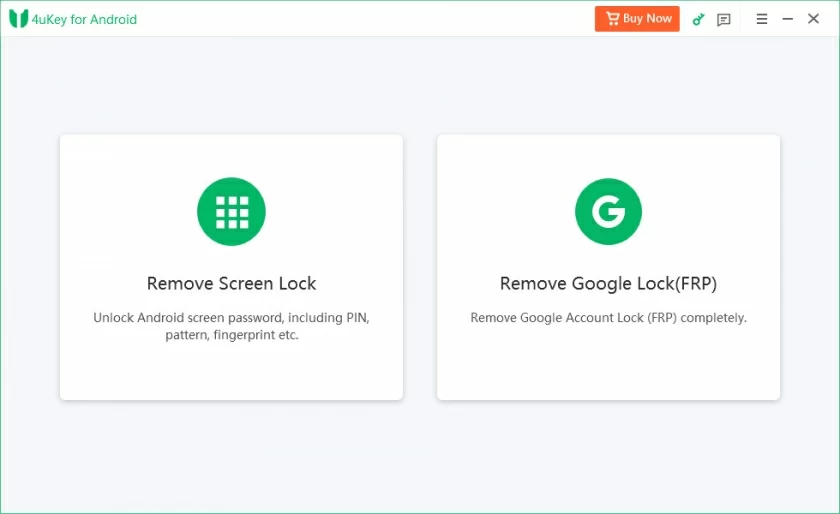
Step 2 Select the device brand and set a specific mode to erase the data, such as Xiaomi.
Step 3 Geekersoft Android Unlocker will initiate the unlocking process of the Android screen. Later, wait patiently for the unlocking process to complete. When you see the "Completed" prompt, it indicates that you have successfully unlocked the screen of your Android device.
If you accidentally forget the pattern lock password of your Xiaomi phone, Xiaomi Cloud Service might be able to help you solve the problem. However, there is a prerequisite for this method. That is, you have to synchronize the device with Xiaomi Cloud first, and using this method will clear all the files stored on the mobile phone. If you want to unlock your Xiaomi phone with your MI account, you can follow the steps below to remotely reset the device and regain access.
Step 1 When you fail to unlock the mode lock multiple times, the MI system interface will lock the device. At this point, click the "Forgot Password" option;
Step 2 Enter your MI account details, such as the account ID and password, to unlock the screen.
This method is applicable to various Xiaomi devices. Models such as Redmi 9 and Redmi Note 9 Pro can all be used. Here, it is necessary to remind everyone that regular data backup is very crucial, which can effectively prevent the loss of important files. With the help of Xiaomi Cloud Service, you can bypass the lock screen and successfully unlock your Xiaomi phone.
If your MI phone is locked and has neither been synchronized with the MI account nor associated with the PC package before, you can try the hard reset method to unlock the device. However, it should be noted that this method will clear all the data in the mobile phone. Therefore, please consider carefully before continuing with the operation. By following the steps below, you can perform a hard reset to bypass the pattern lock and restore the device to factory Settings. The specific operation process is as follows.。
Step 1 Press and hold the power button of your Xiaomi phone for a long time until the phone shuts down. Hold down the "Volume Up" key and the "Power" key simultaneously. When the Xiaomi brand logo appears on the phone screen, continue to hold down the keys. At this point, the phone will enter the "recovery mode", and you can use the volume keys for navigation operations.
Step 2 In the recovery mode, select the "Erase Data" option. This operation will delete all the content stored on the MI phone. After entering the new interface, select the "Erase All Data" option to authorize the data erasure operation.
Step 3 After the entire data clearing process is completed, select the "Restart" option to restart the MI device.After completing the above steps, you can set a new pattern lock on your MI phone. In addition, this method is applicable to unlocking Xiaomi mobile phones. Models like Redmi 9 and Redmi Note 9 Pro can all use it. However, it is very crucial to back up data regularly to avoid the loss of important data.
Furthermore, Xiaomi has equipped its devices with a mobile phone management tool called MI PC Suite. Users can download this tool from the official website of Xiaomi to unlock the MI pattern lock. This practical tool is feature-rich, enabling users to easily manage device data, back up files, and even unlock the pattern lock of Xiaomi phones. To bypass the lock screen using MI PC Suite, simply download and install MI PC Suite on your computer and follow the simple steps to regain access to your device. The specific operation steps are as follows.Step 1 Shut down the Xiaomi device, and then run MI PC Suite. Connect the Xiaomi device to the computer with a data cable, and the MI PC Suite will be able to detect the mobile phone soon.
Step 2 Press the "Volume Up" key and the "Power" key simultaneously to put the Xiaomi phone into "Recovery Mode". In the list of options that appears, select the "Restore" option and then continue the operation.
Step 3 Click the "Update" TAB, and then click the "Erase" button. This operation will clear all the stored data on the Xiaomi mobile phone. After that, the device will restart automatically very soon.
Step 4 Select the "ROM Selection" button on your phone to choose the appropriate ROM type for your Xiaomi phone. Click the "Update" button to start installing the ROM.
Step 5 After the installation is completed, reset the MI pattern lock, and then you can use the device normally.
Q1 Can a Xiaomi device be unlocked when there is no Internet connection?
Some unlocking methods require an Internet connection, such as using Mi Account credentials for recovery operations. However, there are also some offline unlocking methods that can be achieved even without a valid Internet connection. For example, enter the recovery mode through a specific hardware key combination, and then perform the factory reset operation.
Q2 Is it safe to unlock a Xiaomi phone?
The security is guaranteed by using the unlocking method provided by Xiaomi officially. Similarly, if a reputable third-party software like Geekersoft Android Unlocker is chosen, the unlocking process is usually safe as well. Other methods, such as hard resets, will not cause security issues as long as they are operated with caution.
The above are several methods we have introduced to you for unlocking the MI pattern lock. Although methods such as hard reset can lead to data loss, with the help of reliable backup options, such as the built-in backup function of Xiaomi or Google Drive, your information can be effectively protected. If you haven't backed up your data yet, don't worry! Geekersoft Android Unlocker is always ready to solve your problems. This tool can not only easily unlock the mode lock, but also recover deleted or erased data from MI devices. With Geekersoft Android Unlocker, you can smoothly unlock your phone and safely retrieve files, ensuring your data is properly managed and protected. Finally, it is crucial to regularly back up the data of your MI phone. This can ensure the safety and peace of mind of your files. Even if you forget the pattern lock, you don't have to worry.