- Data Recovery
- Data Recovery for PC
- Data Recovery for Android
- Data Recovery for iPhone/iPad
- Unlock For Android
- Unlock for iPhone/iPad
- Android System Repair
- iPhone/iPad System Repair

Updated By Cameron On May 21, 2026, 5:39 pm
Recently, many Mac users have been searching online for high-quality file recovery software suitable for Mac to recover lost videos. As is well known, the anxiety and stress of losing important data on a Mac simply follow you like a shadow. After all, recovering lost or deleted data on a Mac may be much more difficult and complex than recovering data on a Windows system. Because the MacOS system itself does not have a built-in data recovery tool, this means that most of the time we can only rely on third-party Mac data recovery software. However, the reality is a headache. The compatibility of many third-party software with the Mac operating system, the APFS file system, or chips such as M1, M2, M3, M4, intel, and T2 is not ideal. Many software programs either perform poorly or crash directly during the data recovery process, causing users to waste their time and energy in vain.
When we search for Mac data recovery software online, there are a wide variety of tools available. However, the problem is that the search results do not tell us which software is perfectly compatible with the Mac system and the APFS file system. You might be wondering: Which one is the best file recovery software on Mac and can truly and effectively help us recover data from Mac? Don't worry. This article will delve into the necessary standards that a qualified Mac deleted/lost file recovery software should possess, and will also conduct a series of rigorous tests to ultimately identify the most suitable data recovery software for Mac. We will select the most popular Mac data recovery software tools for testing, and comprehensively analyze their main functions, performance and compatibility with Mac during the Mac data recovery process.
To identify the best Mac data recovery software among numerous options, we need to make a judgment based on some fundamental criteria, which mainly focus on key aspects such as the software's functionality, compatibility with Mac, performance, and recovery success rate. The following are the latest standards for 2025 to help you make a wise choice:
1. Compatibility and file system support: Ensure that the software supports the latest macOS version as well as file systems such as APFS, HFS+, FAT32, and exFAT. Some software also supports data recovery from devices such as SSDS, USB drives, and SD cards.
2. Recovery capability and scanning technology: Deep scanning and fast scanning functions are essential options.
3. User-friendliness and interface design: An intuitive GUI is suitable for ordinary users, while command-line tools are more appropriate for technical experts. In addition, the preview function allows for checking the file integrity before restoration.
4. Data protection and additional functions: The vault recovery and cloning functions can prevent secondary data loss. Some software also provides the function of repairing damaged files.
5. Price and Licensing Model: The free version of the data recovery tool is suitable for light needs, while the paid version offers unlimited recovery. In addition, enterprise-level solutions are suitable for professional data recovery needs.
6. Performance and Scanning Speed: Some software may scan slowly, while Geekersoft Data Recovery and others have optimized the scanning efficiency.
7. Technical Support and Update Policy: Give priority to software that offers lifetime updates or remote expert assistance (such as Geekersoft Data Recovery).
If you want to select the best option from the numerous Mac file recovery software, it is essential to conduct a comparative analysis of the widely popular recovery tools on the market. This section will conduct a comprehensive, fact-based and in-depth functional comparison around the following several mainstream recovery tools, such as Geekersoft Data Recovery Mac version, DiskGenius, EaseUS and Disk Drill, etc.
In the function comparison section, Geekersoft Data Recovery performed better than EaseUS, Disk Drill and DiskGenius in various recovery scenarios. Whether you are facing the need to recover a crashed Mac system, retrieve lost video clips on your Mac, restore large documents, repair damaged Mac photos, or perform data recovery for Macs equipped with M4 chips, or handle other types of file recovery needs, Geekersoft Data Recovery can help you recover easily.
Restore data on a Mac using the M4 chip
The outstanding performance of Geekersoft Data Recovery is largely attributed to its advanced algorithms. Its algorithm is elaborately designed to conduct a deep scan of users' Macs and more accurately locate lost or deleted files. Not only that, Geekersoft Data Recovery has over 30 patents in the field of data recovery and also provides targeted recovery services for different file types. The range of devices for which it can recover data is extensive, covering Macintosh HD, HDD/SSD, external devices, crashed Macs, NAS servers, and Linux PCS, etc. In addition, Geekersoft Data Recovery has a recovery success rate as high as 99.5%, capable of comprehensively restoring all kinds of deleted files, videos, and original photos, and supports over 1,000 file formats. The function of this data recovery software to repair damaged videos/photos is also one of the reasons why it is highly praised by many users.
When choosing the best data recovery software for Mac, performance is also a key factor that cannot be ignored. Next, we will conduct a performance comparison of several of the most popular Mac recovery tools at present based on the following indicators:From the perspective of the overall Mac data recovery performance data, Geekersoft Data Recovery surpasses EaseUS, Disk Drill and DiskGenius in several key dimensions such as startup speed, file display speed, scan speed and scan quality.
The following is a detailed test of key performance factors, covering aspects such as file execution speed under the APFS system, scanning speed under the APFS file system, and scanning quality under the APFS system.
3.1 File display speed under the APFS file system
To gain an in-depth understanding of the file display speed performance of these tools under the APFS file system (the shorter the time, the higher the efficiency), we conducted a series of tests. It can be clearly seen from the test results that in most test scenarios, Geekersoft data recovery only takes 2 seconds, demonstrating the most significant advantage in file display speed on Mac.
3.2 Scanning Speed under the APFS file system
The scanning speed under the APFS file system refers to the speed at which software searches for and locates lost files. In most test scenarios, Geekersoft Data Recovery performs best in file scanning speed on the Mac APFS file system.
3.3 Scan Quality under the APFS file system
The scanning quality directly reflects the accuracy of the software in detecting and restoring files. Judging from the test results, the scan quality of Geekersoft Data Recovery is the most outstanding. Especially when recovering data from Mac devices equipped with M1 to M3 chips, its deep scanning quality performs particularly well.
When choosing the best data recovery software for Mac, compatibility is undoubtedly a crucial consideration factor. In most cases, third-party Mac data recovery software is often not fully compatible with the macOS operating system, the APFS file system, or the M1 to M4 encryption chips. During the actual operation of data recovery, many third-party Mac data recovery software may crash on Mac. A data recovery tool that can run smoothly, stably and highly compatibly on Mac is an important consideration for many users when choosing data recovery software.
Next, we will compare and analyze the compatibility of the most popular Mac data recovery tools in the following key indicators:
When performing data recovery on a Mac, the importance of having a software tool that can seamlessly integrate with the Mac operating system and Mac chips is self-evident. By evaluating the compatibility performance of several software such as Geekersoft Data Recovery, Disk Drill, EaseUS and DiskGenius, the results show that Geekersoft Data Recovery performs the most outstandingly in terms of compatibility. It provides the most comprehensive support for various Mac systems, as well as Mac M1 to M4/T2 chips, and even SIP (System Integrity Protection) and Mac Time Machine. It has SIP compatibility and can ensure that the integrity of the system is maintained when performing complex data recovery tasks. Geekersoft Data Recovery can ensure that the user's system is always in a safe and protected state during the process of recovering lost files from Mac.
To gain a thorough understanding of the scanning mode performance of these tools under different macOS systems and chip compatibility conditions, we conducted a series of comprehensive and detailed tests. Geekersoft Data Recovery and Disk Drill are basically capable of supporting all Mac system versions from macOS 10.10 to macOS 15Beta, as well as the full range of Intel/M1 / M2 / M3 / T2 chips.
It is worth mentioning that the fast scan and deep scan functions of Geekersoft Data Recovery can be perfectly adapted in all Mac environments. Based on the results of this test, Geekersoft Data Recovery ranks first in terms of compatibility and is undoubtedly the most reliable choice for users of different Mac operating systems.
Overall, Geekersoft Data Recovery can handle the macOS file system excellently, ensuring to provide users with high-quality and reliable Mac data recovery services. Whether you are using the latest APFS file system, the widely used FAT32/exFAT file system, or other types of file systems, Geekersoft Data Recovery can demonstrate outstanding performance. Geekersoft Data Recovery is undoubtedly the best Mac data recovery tool.
Geekersoft Data Recovery is powerful and has received high praise from users all over the world. Whether files are accidentally deleted or the device is damaged for various reasons, it can help users retrieve precious data. Geekersoft Data Recovery has excellent cross-platform compatibility and supports both Windows and Mac systems simultaneously. Users can recover data from a wide variety of storage devices, including common HDDS (mechanical hard drives), USB drives, and SD cards, etc. In addition, Geekersoft Data Recovery is simple and easy to use. With just three simple steps, users can recover data from their Macs.
Step 1 On your Mac, install and startGeekersoft Data Recovery.
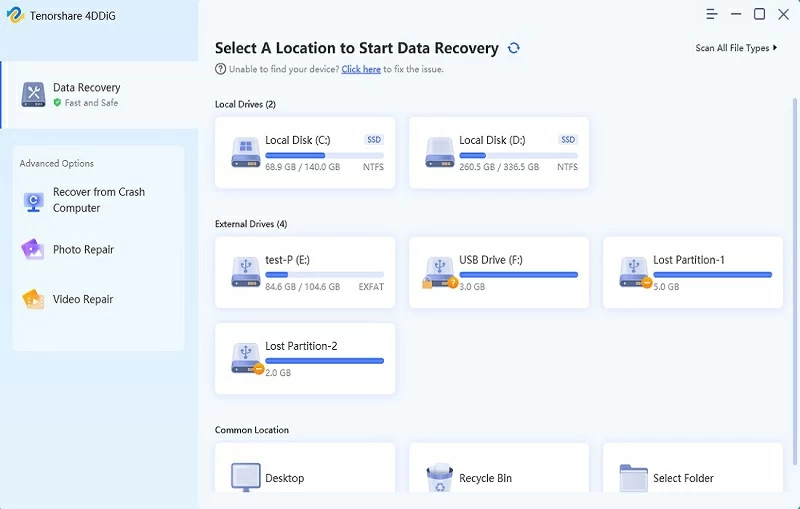
Step 2 After selecting the location where you want to retrieve data, Geekersoft Data Recovery will automatically start scanning for lost or deleted data.
Step 3 After the scan is completed, preview the files found by Geekersoft Data Recovery, select the files you want to save, and click the Recover button to restore the deleted files on your Mac.。
In addition, Geekersoft Data Recovery offers professional and reliable 24x7 customer support, aiming to meet users' data recovery needs. Whether users prefer real-time chat, email or phone support, the support team of Geekersoft Data Recovery is always on standby to help users solve any problems or answer any questions.
To sum up, we can see that Geekersoft Data Recovery is undoubtedly the best data recovery software for Mac users. Geekersoft Data Recovery demonstrates excellent compatibility with various Mac hardware and has the ability to repair damaged files. Geekersoft Data Recovery features a variety of advanced functions, such as high-speed scanning capabilities, comprehensive file system support, and enhanced recovery options, ensuring that users can quickly and efficiently recover Mac data. In addition, it has a user-friendly interface, which simplifies the data recovery process. Whether you are dealing with accidental file deletion, sudden system crash, data damage caused by viruses, or other complex data loss situations, Geekersoft Data Recovery can provide a powerful solution to help you successfully retrieve all precious files from your Mac.