- Data Recovery
- Data Recovery for PC
- Data Recovery for Android
- Data Recovery for iPhone/iPad
- Unlock For Android
- Unlock for iPhone/iPad
- Android System Repair
- iPhone/iPad System Repair

Updated By Tom On May 17, 2026, 8:18 pm
"What are the best free video recovery software?"
If you are facing the predicament of losing important video software, don't worry. There are many free video recovery software available on the market that can help you deal with it. These video recovery software are designed to retrieve lost videos quickly and easily. With the help of high-quality free video recovery software, it is possible for you to regain those precious memories you have lost.
In fact, video files may be deleted due to various reasons such as accidental operations or system malfunctions. At such times, excellent free video recovery software can come into play. These free video recovery tools are not only easy to operate, but also have an excellent recovery success rate. Below, we will introduce to you 10 of the best PC video recovery software to help you quickly retrieve video files. You can choose the most suitable free video recovery software according to your own needs.
When faced with the predicament of lost videos, free video recovery software for PC is undoubtedly the "savior". However, in the face of numerous free video recovery software, how to select the best one requires skills. The following are some key factors to consider when choosing high-quality free video recovery software:
- Efficient recovery performance: By adopting intelligent algorithms to optimize the recovery process, the processing time is significantly shortened while ensuring data integrity, reducing users' waiting costs.
- Deep data mining technology: It offers a deep scan mode, using underlying file system analysis technology to locate hidden files or deleted data that standard scans cannot recognize.
- Intuitive and user-friendly interface: The software should be equipped with a simple and clear user interface design to lower the operation threshold and ensure that novice users can quickly get started without complex training.
- Cross-platform compatibility: Supports mainstream operating system environments, including but not limited to Windows, macOS and Linux systems, ensuring smooth operation for users on different devices.
- Multi-format video recovery support: Compatible with mainstream video file formats such as MP4, AVI, MOV and other common types, and has scalability to adapt to future emerging formats.
- The built-in file preview module for visual preview verification enables users to preview video content before recovery, avoiding the accidental recovery of invalid files and enhancing the accuracy of operations.
- All-weather user support system: Establish a multi-channel customer service mechanism (such as online documents, community forums, and real-time customer service) to ensure that user issues can be responded to and resolved promptly.
- Zero-cost functional guarantee: The basic functional modules are completely free and open, avoiding forced payment pop-ups or hidden consumption. Different user needs are met through reasonable functional classification.
- Lossless data protection mechanism: Read-only data access technology is adopted to strictly isolate the original data during the recovery process, eliminating the risk of secondary damage or overwriting.
- Continuous technological iteration and upgrading: Establish a regular update mechanism to continuously optimize algorithm compatibility and system stability based on user feedback and technological development trends.
In the field of data management, video recovery software is an indispensable tool. It can help us retrieve lost video files at critical moments. Next, we will introduce the top ten free video recovery software for you, and also analyze the advantages and disadvantages of each software in detail.
With its outstanding reliability and efficiency in recovering lost or deleted video files, Geekersoft Data Recovery has gained a high reputation in the video recovery software market and is highly trusted by users, winning a user base from all over the world. This software is designed to offer users an extremely user-friendly operation experience. Whether you are a novice in the field of data recovery or an experienced professional, you can easily complete video recovery.
Geekersoft Data Recovery supports the recovery of various video formats. No matter what reason the video is lost for, it can be easily recovered. In addition, it also features a powerful preview function. Users can pre-view the contents of recoverable files before officially restoring them, which enhances the targeted and efficient nature of the recovery process.
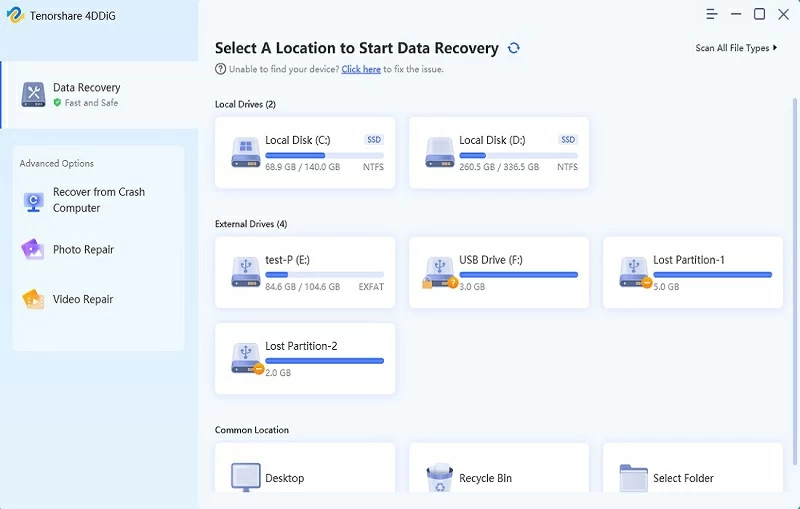
Advantages of Geekersoft Data Recovery:
Support the recovery of data lost due to system crashes, hardware failures, formatting, viruses and other reasons.
It features a simple and intuitive user interface and is easy and convenient to operate.
The recovery success rate is as high as 99.5%, and the data recovery effect is guaranteed.
Support over 1,000 file types, covering various common formats such as videos, photos, and documents.
Disadvantage of Geekersoft Data Recovery:
When scanning large drives is required, the scanning process may take a relatively long time.
On how to use Geekersoft Data Recovery to retrieve lost/deleted video files, you just need to complete the following steps.
Step 1 Install and launch Geekersoft Data Recovery Software on your PC. In the software interface, select the drive where the video files are stored. Then click the Start button on the interface. The software will immediately launch the scanning program to conduct a comprehensive scan of the selected drive to find lost or deleted video files.
Step 2 After the scanning is completed, the software will list all the video files found. Preview and select the video files to be restored.
Step 3 After selecting the video files you want to Recover, click the Recover button. The software will start to recover the selected video file and save it to the specified location.
Minitool Power Data Recovery is another powerful tool that has gained a foothold in the field of data recovery with its high efficiency and ease of use. This software is fully functional and capable of recovering various types of files, including video and audio files. It is worth mentioning that Minitool Power Data Recovery has a deep scanning function, which can deeply mine and accurately locate those files that have been deeply hidden or deleted. In addition, it is committed to creating a seamless recovery experience for users. Through a carefully designed user-friendly interface and rich and effective scanning options, it makes data recovery easy and efficient.
Advantages of Minitool Power Data Recovery:
Support the recovery of various types of files to meet users' diverse data recovery needs.
The software installation package is compact in size, and both the download and installation processes are very convenient, without occupying too many system resources.
Quick recovery operations can be performed on specific locations such as the desktop and the recycle bin, saving users' time.
The deep scan option performs well, capable of deeply exploring lost files and enhancing the success rate of recovery.
Disadvantage of Minitool Power Data Recovery:
When facing some complex recovery scenarios, its data recovery performance is relatively inferior.
Disk Drill is also a highly praised product in the field of video recovery software. With its simple and intuitive interface design, it stands out among many similar software, making the video recovery process clear, understandable and easy to operate. This software has the ability of rapid scanning, which can efficiently locate and recover lost video files, greatly saving users' time and energy.
Not only that, Disk Drill also has additional functions such as data protection and backup, which makes it not only a simple video recovery tool, but also a comprehensive video recovery solution with full functions.
Advantages of Disk Drill:
The interface design is simple and clear, and even novice users can quickly get started with the operation.
It has a fast scanning speed and can quickly locate lost video files.
Support data recovery from various storage devices, including internal hard drives, external hard drives, SD cards, USB drives, etc., all of which can be handled with ease.
It provides practical functions such as Recovery Vault and Data Lost Protection to safeguard data security.
The success rate of data recovery is relatively high, and it can effectively retrieve lost video files.
Disadvantage of Disk Drill:
In the scanning results, sometimes some files that are actually unrecoverable are marked as recoverable.
EaseUS Data Recovery Wizard is a free video recovery software and a data recovery tool chosen by many users. It stands out among numerous similar software with its extremely high data recovery rate and extensive support for various file formats. This software has created an extremely simple recovery process for users. Even those with no experience in data recovery can easily get started and quickly retrieve lost or deleted video files. Not only that, EaseUS Data Recovery Wizard also has practical functions such as partition recovery and emergency disk imaging, transforming itself into a versatile and powerful data recovery tool.
Advantages of EaseUS Data Recovery Wizard:
It has an extremely high data recovery rate and can retrieve lost video files to the greatest extent.
The operation interface is simple and easy to understand, and it is very convenient to use. Even beginners can master it quickly.
Support a wide variety of file formats to meet the needs of different users.
Disadvantage of EaseUS Data Recovery Wizard:
When restoring large files, the speed is relatively slow and users need to be patient and wait.
Recuva is a highly popular free video recovery software. It has won extremely high praise among a wide range of users with its ultra-fast recovery speed and simple and easy-to-use operation interface. Recuva has strong compatibility and can support the recovery of multiple video formats, providing a reliable and effective solution for users to retrieve lost or mistakenly deleted video files. In addition, the software also thoughtfully offers a security overlay function. Through this feature, it can be ensured that deleted files cannot be recovered again, adding an extra layer of protection for users' privacy and data security.
Advantages of Recuva:
For recently deleted files, a quick scan option is provided, which greatly saves users' waiting time.
The interface design is simple and intuitive, and the operation process is easy to understand, which is very friendly to novice users.
The free version is practical and can meet the basic video recovery needs of most users.
Disadvantage of Recuva:
The lack of a file preview function makes it difficult for users to precisely locate the target files when they select the files they need to recover.
Puran File Recovery is a highly recognized free video recovery software on the PC side, and its reliability and practicability have been affirmed by many users. It has won a large number of users in the field of data recovery with its simple and clear interface design and excellent recovery capability. This software supports multiple file formats. Whether it's common or relatively special video file formats, it can handle them with ease, providing a reliable and effective solution for recovering lost or mistakenly deleted video files. It is worth mentioning that Puran File Recovery is also equipped with a deep scan option. With this function, it can deeply mine the data in the hard disk, accurately locate and recover those files that are difficult to be found in standard scans.
Advantages of Puran File Recovery:
The interface design is simple and intuitive, and the operation is convenient. Even users who use it for the first time can quickly get started.
The recovery effect is remarkable and it can efficiently retrieve lost video files.
Support multiple file formats to meet users' diverse data recovery needs.
As a free and open-source software, it is open to everyone for use, reducing the usage cost for users.
Disadvantages of Puran File Recovery:
The interface style is rather old-fashioned and fails to meet the expectations of some users for a modern interface.
The lack of some advanced functions may not fully meet the requirements of users with special needs or those who pursue more abundant functions.
Stellar Data Recovery is a reliable video recovery software. Its free recovery function provides users with efficient and practical data recovery options. The user interface of this software is simple and intuitive. Whether you are a novice just entering the field of data recovery or an experienced advanced user, you can handle it with ease. Furthermore, Stellar Data Recovery also has a preview function and supports multiple file formats, fully ensuring the compatibility and ease of use of the software.
Advantages of Stellar Data Recovery:
It features a user-friendly interface design and is easy to operate, lowering the threshold for users to use.
The recovery effect is reliable and it can retrieve lost video files relatively accurately.
Provide excellent customer support services so that users can receive timely assistance when they encounter problems.
Support multiple file types, covering common formats such as videos, documents and photos, to meet users' diverse recovery needs.
Disadvantage of Stellar Data Recovery:
The recovery speed is relatively slow. When processing a large amount of data, it may take a considerable amount of time.
Softperfect File Recovery is a very convenient video recovery tool. With the characteristics of simple operation and fast recovery speed, it has gained the favor of many users in the field of data recovery. It focuses on recovering files in various video formats and provides a reliable and effective solution for retrieving lost or mistakenly deleted videos. In addition, this software has extensive compatibility and supports multiple file systems, such as common FAT and NTFS file systems. This enables it to meet the diverse recovery needs of different users and makes it a multi-functional option.
Advantages of Softperfect File Recovery:
The interface design is simple and clear, and the operation process is not complicated. Even novice users can quickly get started.
The recovery speed is relatively fast, which can save users a lot of waiting time.
Support multiple video file formats to meet the video recovery needs of different users.
Disadvantages of Softperfect File Recovery:
It has relatively few functions and lacks some more advanced and complex ones.
Without a deep scan option, the recovery effect may not be ideal when dealing with some deeply hidden or hard-to-locate lost video files.
Glary Undelete is a simple, practical and highly effective video recovery software. From the very beginning of its design, it has adhered to the concept of ease of use, aiming to provide reliable solutions for basic video recovery tasks for a wide range of users. This software supports multiple common file formats and demonstrates strong compatibility in recovering lost videos, making it a multi-functional choice for many users to restore their videos. Its interface design is simple and intuitive, and the operation process is clear and easy to understand. Even users who are not very familiar with technical operations and have limited skills can easily get started, navigate quickly and use the software effectively.
Advantages of Glary Undelete:
The operation is simple and convenient. Users can easily complete the video recovery operation without having professional technical knowledge.
The recovery effect is good and it can effectively retrieve the lost video files.
Support multiple file formats to meet users' diverse video recovery needs.
Disadvantage of Glary Undelete:
The functions are relatively limited and there is a lack of a deep scan option.
Pandora Recovery can be regarded as a powerful tool for basic video recovery work. It features a simple, intuitive and easy-to-operate interface design, which enables users with less advanced technical skills to get started and use it with ease. In terms of video Recovery capabilities, Pandora Recovery performs well and can effectively recover video files in various different formats, providing a reliable and practical solution for retrieving lost videos. In addition, the software is also equipped with an advanced search function. With this function, users can quickly and accurately locate and restore specific video files, greatly improving the recovery efficiency.
Advantages of Pandora Recovery:
The interface design is simple and easy to understand, and the operation process is not complicated, which lowers the threshold for users to use.
The recovery effect is good and it can effectively retrieve the lost video files.
The free version is practical and sufficient for the basic video recovery needs of most ordinary users.
Disadvantages of Pandora Recovery:
The lack of some more abundant and advanced functions fails to meet the needs of users with special requirements.
It does not offer more advanced options and is unable to handle complex or special video recovery scenarios.
Video file recovery is a task that requires careful handling. A slight mistake may affect the recovery effect. The following practical tips can help you retrieve lost video files more effectively:
1. Stop using the device immediately: When you notice that a video file is lost, be sure to stop using the device at the first moment. Because during the continuous operation of the device, the writing of new data may overwrite the originally lost video data, which will make the subsequent recovery work extremely difficult and even lead to the inability to recover.
2. Develop the habit of regular backups: Important video files carry many precious memories or key information, and regular backups are of vital importance. You can store a copy of the video on an external drive, such as a portable hard drive or USB flash drive, or upload it to a cloud storage platform. In this way, even if there is an accident with the equipment, the risk of data loss can be greatly reduced.
3. Select reliable video recovery software: When faced with various video recovery software in the industry, it is necessary to choose a trustworthy and powerful free software. This type of professional tool has been carefully designed and optimized, with the ability to efficiently retrieve lost files, and can provide strong support for i's video recovery work. In addition, ensuring that the video recovery software you use is always up to date can help increase the success rate of video file recovery.
4. Be cautious of physical damage: During daily use, the equipment should be taken extra care of to prevent data loss due to physical damage. It is recommended to place the device in a dedicated protective box to prevent it from being exposed to harsh environments such as high temperatures, humidity, and strong magnetic fields, thereby reducing the risk of data loss caused by accidental collisions or drops.
5. Confirm the support for file formats:Before choosing a recovery software and performing the recovery operation, make sure that the software supports the video file format you want to recover. The scope of support for file formats varies among different software. Only by choosing software that supports the corresponding format can the chance of successfully recovering video files be increased.
By following the above techniques, you will be able to significantly increase the probability of successfully recovering lost video files while avoiding data loss.
When video files are accidentally lost, for the majority of PC users, having a practical and free video recovery tool is undoubtedly an indispensable "essential skill". However, it is not an easy task to pick out the most suitable one among the numerous free video recovery software available for PC. After comprehensive comparison and repeated trials, Geekersoft Data Recovery has performed outstandingly among numerous PC video recovery software and is widely recognized by users as the preferred tool. It stands out in the highly competitive market with its extremely high recovery success rate and simple, user-friendly interface. This software is powerful and can easily handle the recovery work of various video formats. Geekersoft Data Recovery can ensure the recovery of most lost or deleted video files to the greatest extent, allowing you to no longer worry about video loss.