- Data Recovery
- Data Recovery for PC
- Data Recovery for Android
- Data Recovery for iPhone/iPad
- Unlock For Android
- Unlock for iPhone/iPad
- Android System Repair
- iPhone/iPad System Repair

Updated By Tom On Sep 25, 2026, 8:41 pm
In the Apple support community, a user has reported: "Recently, when transferring files from an SD card to a Mac external hard drive, I encountered a problem of video file loss. The cause of the fault is not yet clear. I urgently need a high-quality file recovery software compatible with the Mac system to retrieve the deleted video data." " This feedback reflects the common predicament faced by Mac users in data management - the loss of important data often comes with considerable pressure, and the data recovery operation of the Mac system itself is highly difficult and complex, with a significantly higher recovery difficulty than that of the Windows system. If you are also facing this predicament, then you mustn't miss this article. This article will first sort out the core standards that a "qualified Mac lost/deleted file recovery software" should possess; Subsequently, through systematic evaluation, the current mainstream Mac data recovery software was assessed, and ultimately the best tool was selected. During the evaluation process, the core functions, data recovery performance and system compatibility of each software will be analyzed in detail to ensure that the assessment results are objective and practical, providing a scientific reference for Mac users to choose the appropriate file recovery tool.
1. The MacOS system does not have a built-in dedicated data recovery tool. Users cannot solve the problem of data loss through the system's native functions and must rely on third-party software.
2. Most third-party Mac data recovery software has compatibility flaws and is difficult to achieve deep adaptation with Mac operating systems, APFS file systems (the mainstream file systems for Mac), and different architecture chips such as M1/M2/M3/M4/Intel/T2.
To screen out the top data recovery programs suitable for the Mac platform in 2021, an evaluation system should be established around four core dimensions: functional coverage, system compatibility, recovery performance, and ease of use. Based on this, we have developed a strict evaluation method to conduct a comprehensive examination of Mac data recovery tools. The specific sub-dimensions of each standard are as follows:
(1) Functional coverage: Meets the recovery requirements of all scenarios
High-quality Mac data recovery software should have in-depth functional reserves and be capable of handling diverse data loss scenarios. The core evaluation factors include:
High-definition video specialized recovery: Can it support the matching and complete recovery of large-sized video clips such as HD, 4K, and 8K, and solve the problem of high difficulty in restoring high-resolution videos?
Multi-format and multi-device compatibility: The number of supported file recovery formats (such as documents, media, compressed packages, etc.) and the types of storage devices that can be adapted (such as built-in hard drives, external hard drives, SD cards, USB flash drives, etc.);
Cloud recovery capability: Whether it supports directly storing the recovered data to the cloud (such as iCloud, OneDrive, etc.) to enhance the flexibility of data storage;Integrated recovery and repair: In addition to the basic recovery of photos, videos and documents, can damaged files (such as videos that cannot be played and photos that cannot be opened) be repaired simultaneously to enhance the practicality of data recovery?
(2) System Compatibility: Compatible with the entire Mac ecosystem architecture
Compatibility is the fundamental prerequisite for Mac data recovery software. It is necessary to focus on examining its adaptability to Mac hardware, systems, and file systems.
File system compatibility: Whether it can perfectly adapt to the mainstream file systems of Mac (such as APFS, HFS+, etc.) to avoid incomplete scanning or failed recovery due to file system mismatch;
Operating system compatibility: The range of supported macOS versions, whether it can cover the adaptation requirements from old versions to the latest versions (such as macOS Sonoma);
Chip architecture compatibility: Whether it supports the full range of Mac chips (including self-developed M1/M2/M3/M4 series chips and Intel chips, T2 security chips), and breaks through the limitations of hardware architecture.
(3) Restoring performance: Ensuring high efficiency and high success rate
The recovery performance directly determines the practicality of the software and needs to be evaluated from three aspects: resource occupation, speed and success rate.
Resource usage control: Memory and CPU resources occupied during software installation and scanning to prevent Mac lag caused by excessive resource consumption.Operation and scanning speed: The response speed of software installation and startup, as well as the scanning speed under different file systems such as APFS, FAT32/EXFAT, and shortening the waiting time;
Recovery success rate: The probability of successfully recovering the target file in different data loss scenarios (such as accidental deletion, formatting, device crash) is a core indicator for performance evaluation.
(4) Ease of use: Lower the operational threshold for users
The software needs to balance professionalism and ease of use, while providing reliable after-sales support. The evaluation dimensions include
Interface and operation design: Whether it has an intuitive user interface and clear operation logic to ensure that non-professional users can also quickly get started;After-sales support service: Whether 7× 24-hour customer support is provided (such as online customer service, email consultation) to promptly solve problems encountered by users during the usage process;User word-of-mouth verification: User ratings and feedback on professional evaluation platforms such as G2 and Trustpilot, reflecting the actual usage experience of the software.
To select the most outstanding file recovery software on the Mac platform, it is necessary for us to evaluate the currently popular recovery tools in the market. To determine the best file recovery software for the Mac platform, We selected four mainstream Mac data recovery tools in the current market - Qike Data Recovery, DiskGenius, EaseUS, and Disk Drill - and conducted a fact-based in-depth comparison from dimensions such as functional coverage, scene adaptability, and technical advantages.
1. Overview and Comparison of Core functions
The following is a comparison of the functions of these Mac data recovery software:
In terms of functional features, Geekersoft Data Recovery has demonstrated significant advantages over EaseUS, Disk Drill and DiskGenius in numerous recovery scenarios. Whether it's data rescue after a Mac system crash, precise recovery of specific video clips, retrieval of large-capacity documents, repair of damaged files (such as Mac photo recovery), data recovery on Mac devices equipped with M4 chips, or the recovery needs of various other types of files, Geekersoft Data Recovery can provide satisfactory recovery results with outstanding performance.
2. Data recovery for Mac devices equipped with M4 chip
The advanced algorithm architecture of Geekersoft Data Recovery, carefully designed, can deeply scan your Mac device, accurately locate and efficiently recover lost or deleted files. In addition, Geekersoft Data Recovery holds over 35 patents in data recovery technology and offers tailor-made specialized recovery solutions for different file types, ensuring the accuracy and efficiency of the recovery process.
Geekersoft Data Recovery provides professional data recovery services to customers with a success rate as high as 99.5%. It can fully recover all deleted files, videos, even original photos and over 1,000 file formats from more than 2,000 storage devices (including Macintosh HD, HDD/SSD, external storage devices, crashed Mac systems, NAS servers and Linux PCS, etc.). It is particularly worth mentioning that this software also has the function of repairing damaged videos/photos, providing comprehensive protection for users' data security.
When choosing top-tier data recovery software for the Mac platform, compatibility is undoubtedly one of the core considerations. Currently, third-party Mac data recovery tools generally have adaptation shortcomings: Most software cannot achieve deep compatibility with the macOS operating system, APFS file system, and M1 to M4 series encryption chips. This can lead to incomplete scanning and failed recovery at best, and trigger program crashes during operation at worst. Not only does it fail to solve the problem of data loss, but it may also increase the security risk of the system. Starting from the core demands of users, a high-quality Mac data recovery software must have the ability to "run smoothly in all environments and be stably adapted across hardware", which is the fundamental prerequisite for ensuring the efficient advancement of data recovery tasks.
1. Comprehensive assessment of Mac system/chip compatibility
In the field of Mac data recovery, a software tool that can seamlessly integrate with the Mac operating system and chips is particularly crucial. This not only ensures that all lost files on Mac can be recovered efficiently and accurately regardless of which version of macOS the user is using.
Through the compatibility test of four mainstream tools, namely Geekersoft Data Recovery, Disk Drill, EaseUS and DiskGenius, Geekersoft Data Recovery performed the best in terms of the breadth and depth of adaptation: It not only supports the full series of macOS systems from the old version to the latest version, M1 - M4 and T2 encryption chips, but also realizes the compatibility of system security mechanism (SIP) and native backup tool (Time Machine), forming the full-link adaptation capability of "hardware - system - security - backup".
SIP compatibility is of vital importance to data recovery software, as it ensures the integrity and security of the system while performing complex data recovery tasks. It is not difficult to see from the relevant data that Geekersoft Data Recovery performs outstandingly in ensuring system security. It can provide a solid guarantee for users' data security during the process of recovering lost files from Mac. These outstanding functional features have made Geekersoft Data Recovery one of the leading players in the Mac data recovery field. In addition, Geekersoft Data Recovery also has the ability to recover data from Time Machine backups, providing users with a more comprehensive data recovery solution.
2. In-depth Analysis of Compatibility Testing
To gain a deeper understanding of the scanning mode compatibility performance of these tools in different macOS systems and chip environments, we conducted a series of comprehensive and in-depth tests. The following table presents in detail the data collected during the testing process. Let's delve into it together.
Through rigorous testing, we clearly found that Geekersoft Data Recovery and Disk Drill perform excellently in terms of compatibility and basically support all Mac system versions from macOS 10.10 to macOS 15Beta. And the full range of Intel/M1/M2/M3/T2 chips.
It is particularly worth mentioning that the quick scan and deep scan functions of Geekersoft Data Recovery are perfectly supported in all Mac environments. Disk Drill is on par with Geekersoft Data Recovery in terms of Mac system compatibility. However, on Mac devices using the latest M4 chip, the deep scan function of Disk Drill sometimes fails to display files. Based on the results of this test, Geekersoft Data Recovery stands out in terms of compatibility and ranks first, becoming the most reliable choice for users of different Mac operating systems.
In contrast, EaseUS has certain limitations in terms of compatibility. It does not support data recovery from Mac devices with certain Intel series chips, nor is it compatible with macOS system versions lower than macOS 10.12. The deep scan function of DiskGenius cannot support data recovery from Mac devices equipped with M series and T2 chips, and is also incompatible with macOS system versions lower than macOS 10.12.
When screening the best data recovery software for the Mac platform, performance is a crucial metric. Users expect to recover the required data from Mac devices quickly and efficiently with the help of a tool.
Based on a comprehensive assessment of Mac data recovery performance data, Geekersoft Data Recovery has demonstrated significant advantages over EaseUS, Disk Drill and DiskGenius in multiple key dimensions such as startup speed, file rendering speed, scanning rate and scanning quality.
The following will conduct a detailed test and analysis around the key performance indicators under the APFS file system, covering aspects such as file rendering speed, file transfer speed, and scan quality.
1. File rendering speed under the APFS file system
To accurately assess the file rendering efficiency of each tool on the APFS file system (the shorter the rendering time, the higher the efficiency), we conducted a series of targeted tests. The following table details the file rendering speeds (in seconds) of these data recovery software under different APFS test environments.
The test data clearly shows that in the vast majority of test scenarios, Geekersoft Data Recovery only takes 2 seconds to complete file presentation, demonstrating an extremely outstanding file presentation speed and efficiency on Mac devices.
2. Scanning speed under the APFS file system
The scanning speed under the APFS file system is directly related to the efficiency of searching for and finding lost files (the shorter the scanning time, the higher the efficiency). The following table presents the scanning speeds (unit: seconds) of these Mac data recovery software under different APFS test environments.
Through data analysis, it can be known that in most test scenarios, Geekersoft Data Recovery performs the best in file scanning speed on the Mac APFS file system.
3. Scan quality under the APFS file system
Scanning quality is an important indicator for measuring the accuracy of data recovery software in detecting and recovering files.
Geekersoft Data Recovery excels in scan quality, especially when recovering data from M1-M3 Mac devices, its deep scan function can provide extremely high recovery quality. Geekersoft Data Recovery can work efficiently in coordination with the macOS file system, ensuring stable and outstanding performance during the Mac data recovery process, whether dealing with the latest APFS file system, the widely used FAT32/exFAT file system, or other types of file systems.
Based on the detailed test data in terms of functionality, performance and compatibility mentioned above, we can draw the conclusion that compared with its competitors, Geekersoft Data Recovery has more prominent comprehensive advantages and is undoubtedly the best Mac data recovery tool. In the following chapters, we will delve into how to efficiently recover Mac data using Geekersoft Data Recovery software.
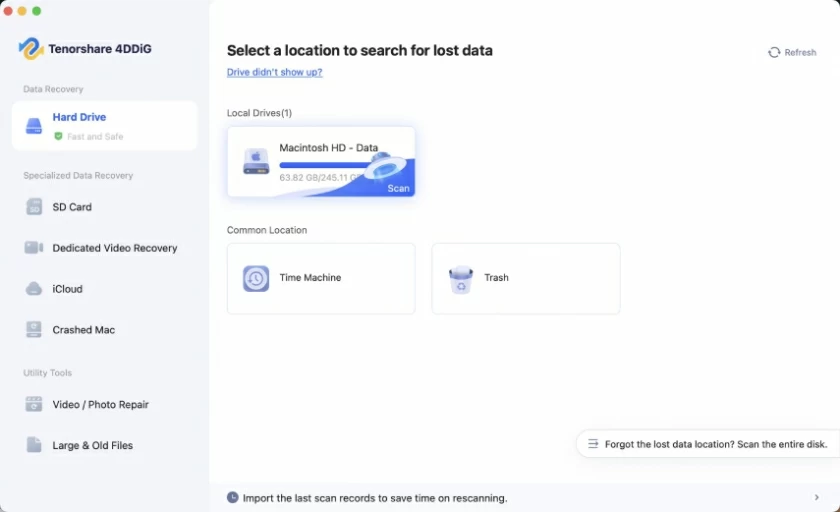
Geekersoft Data Recovery (Mac) is an efficient and reliable Mac data recovery tool. With a recovery success rate of approximately 99%, it has become one of the leading data recovery solutions in the market. Geekersoft Data Recovery always combines a user-friendly design concept with flexible and diverse customer support services, dedicated to ensuring that users can complete data recovery tasks efficiently and confidently. This software is easy to operate and has a clear interface. It can effectively deal with common data loss problems such as accidental deletion, formatting, and system crash, and supports the recovery of various file types including photos, videos, and documents.
1. Core functions of Geekersoft Data Recovery (Mac):
- Extensive device compatibility: Supports over 2,000 devices including Mac computers, laptops, external hard drives (HDD/SSD), memory cards and USB flash drives.
- Comprehensive file support: Can recover over 1000 file formats, covering documents, images, audio, video, etc.
- Multi-scenario data recovery: Applicable to over 500 data loss situations, including accidental deletion, formatting, system failures, etc.
- Intelligent scanning technology: Utilizing patented algorithms, it automatically reorganizes video clips to ensure that the restored video is complete and playable.
- NAS Data recovery: Data can be recovered directly from a NAS server accessible on a Mac without disassembling the hard drive.
- Faulty Mac data extraction: Support file recovery from Macs that cannot start or are stuck on a gray screen, white screen, or black screen.
- Backup and recovery capability: Lost data can be retrieved from Time Machine backups or disk images.
- File repair function: Supports previewing and repairing damaged photo, document and video files.
2. Performance of Geekersoft Data Recovery (Mac):
- High recovery rate: The success rate of data recovery is approximately 99%, leading the industry.
- Quick Scan: Data retrieval can be completed within minutes, with excellent efficiency.
- High-quality recovery effect: The restored files maintain their original quality with high integrity.
- Excellent user reviews: The Geekersoft Data Recovery (Mac) has performed outstandingly in professional evaluations and user feedback. The majority of users are satisfied with its recovery effect, but a few users have reported incomplete recovery in certain situations.
For information on how to use Geekersoft Data Recovery software to recover deleted data on Mac, you can refer to the following steps:
Step 1 Install the Geekersoft Data Recovery software on your Mac device. After starting the software, select the original storage location of the deleted photos in the interface (such as the internal hard drive partition, external storage device, etc.). After confirming the selection, click the "Start" button to start the scanning process.
Step 2 The software will conduct a thorough scan of the selected storage location. The duration of the scan is affected by the capacity of the storage device, the amount of data, and the scanning mode (quick scan/deep scan). During this period, it is necessary to maintain a stable connection of the device to avoid interrupting the scan.
Step 3 After the scanning is completed, the software interface will display all recoverable files. For example, Users can filter the target files through the "Photos" category and click on the files to preview the content. After selecting the photos to be restored, click the "Restore" button, choose a safe storage path (it is recommended to be different from the original storage location to avoid data overwriting), and the photo recovery is completed.
After a comprehensive and rigorous series of tests and evaluations, we can know that Geekersoft Data Recovery is the best choice in the field of data recovery for Mac users. Whether users are confronted with accidental file deletion, system crashes, data loss caused by power surges, or other complex and difficult data loss situations, Geekersoft Data Recovery can provide powerful and effective solutions to help users successfully retrieve all valuable files from Mac devices and safeguard their data security.