- Data Recovery
- Data Recovery for PC
- Data Recovery for Android
- Data Recovery for iPhone/iPad
- Unlock For Android
- Unlock for iPhone/iPad
- Android System Repair
- iPhone/iPad System Repair

Updated By Soha On Sep 10, 2026, 8:29 pm
There are numerous and complex data recovery software options for Mac devices. Do you know how to select the best one from them? Don't worry. To save your time and energy, we have tested numerous tools, covering our objective evaluations, core functions, recovery performance, price positioning, and user feedback, etc., to help you select the best Mac device data recovery software. This article will introduce you to five top data recovery software for Mac. You can choose based on your own needs and working habits, etc.
When choosing Mac data recovery software, it is recommended to focus on the following core indicators
1. Device compatibility: Ensure support for your Mac model and system version.
2. Recovery capability: Supports target file types and data loss scenarios.
3. Recovery success rate: Select professional solutions with high data recovery rates.
4. Price Budget: Select a cost-effective and appropriate plan.
5. Operating Interface: An intuitive and user-friendly interface can enhance the user experience.
6. User Reviews: Select reliable products based on real user feedback.
By comprehensively evaluating these key factors, it can help you choose the most suitable Mac data recovery tool.
In the following section, we will introduce to you five top professional data recovery solutions suitable for Mac devices from aspects such as the performance, advantages and disadvantages of each software.
Geekersoft Data Recovery (Mac) is an efficient and reliable Mac data recovery tool. With a recovery success rate of approximately 99%, it has become one of the leading data recovery solutions in the market. This software is easy to operate and has a clear interface. It can effectively deal with common data loss problems such as accidental deletion, formatting, and system crash, and supports the recovery of various file types including photos, videos, and documents.
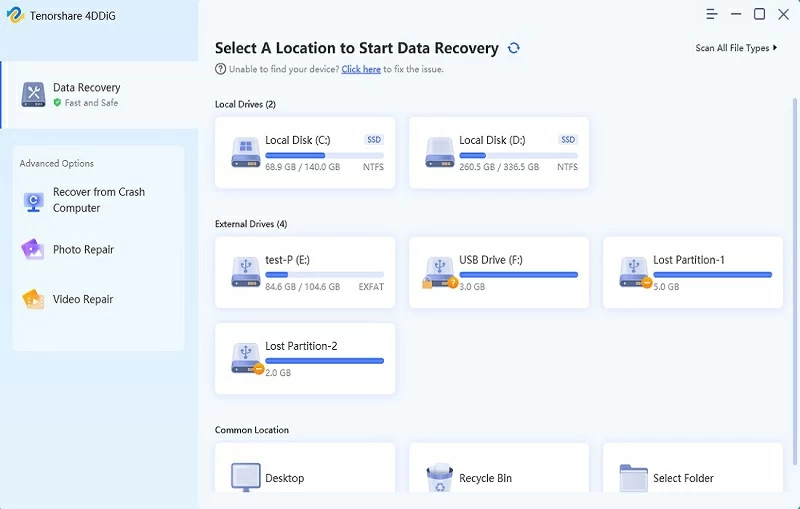
Core functions of Geekersoft Data Recovery (Mac):
- Extensive device compatibility: Supports over 2,000 devices including Mac computers, laptops, external hard drives (HDD/SSD), memory cards and USB flash drives.
- Comprehensive file support: Can recover over 1000 file formats, covering documents, images, audio, video, etc.
- Multi-scenario data recovery: Applicable to over 500 data loss situations, including accidental deletion, formatting, system failures, etc.
- Intelligent scanning technology: Utilizing patented algorithms, it automatically reorganizes video clips to ensure that the restored video is complete and playable.
- NAS Data recovery: Data can be recovered directly from a NAS server accessible on a Mac without disassembling the hard drive.
- Faulty Mac data extraction: Support file recovery from Macs that cannot start or are stuck on a gray screen, white screen, or black screen.
- Backup and recovery capability: Lost data can be retrieved from Time Machine backups or disk images.
- File repair function: Supports previewing and repairing damaged photo, document and video files.
Performance of Geekersoft Data Recovery (Mac):
- High recovery rate: The success rate of data recovery is approximately 99%, leading the industry.
- Quick Scan: Data retrieval can be completed within minutes, with excellent efficiency.
- High-quality recovery effect: The restored files maintain their original quality with high integrity.
- Excellent user reviews: The Geekersoft Data Recovery (Mac) has performed outstandingly in professional evaluations and user feedback. The majority of users are satisfied with its recovery effect, but a few users have reported incomplete recovery in certain situations.
Advantages of Geekersoft Data Recovery (Mac):
- Wide range of support.
- High recovery success rate.
- The free version is feature-rich.
- Support preview before recovery.
- Multiple files can be restored simultaneously.
Disadvantages of Geekersoft Data Recovery (Mac):
- When restoring large files, the program's running speed may be affected.
- Occasionally, duplicate results may occur.
Overall, with its powerful functions, efficient recovery capabilities and excellent user experience, the Geekersoft Data Recovery (Mac) is the preferred solution for Mac users to recover data.
In addition, Disk Drill (Mac version), which has many users, is one of the recovery tools favored by Mac users. Its interface is simple and easy to use, with rich functions, which significantly improves the recovery performance. However, the technical requirements of Disk Drill and the need to select different versions according to the device are somewhat lacking.
Core functions of Disk Drill (Mac version) :
- Compatible with the latest M3 chip Mac;
- Support data recovery from iPhone and iPad, and also supports scanning and restoring data from Time Machine backups and snapshots;
- Equipped with free Disk health tools such as SMART Disk Monitor, Duplicate Finder and Data Protection Services;
Performance of Disk Drill (Mac version) :
- Disk Drill sometimes runs slowly, usually slower than other similar software. There are various reasons, one of which is that its operation needs to meet specific technical requirements.
- Despite the poor speed, Disk Drill can still provide excellent recovery results and retrieve all the lost data from a specific location.
- Users' evaluations and ratings of Disk Drill are mixed, and there are differences in ratings among various platforms.
Advantages of Disk Drill (Mac version) :
- Rich in functions.
- Provide data protection.
- Support data recovery from mobile devices.
Disadvantages of Disk Drill (Mac version) :
- The price is relatively high.
- The recovery speed is slower than that of other solutions.
- The free version can only scan files and cannot restore them.
Stellar Data Recovery (Mac version) can be regarded as one of the top Mac file recovery software on the market. Its interface design is convenient, allowing users to easily start the data recovery process. Although it does not offer breakthrough features, the data recovery capability of this tool is one of the best in the market.
Core functions of Stellar Data Recovery (Mac version) :
- Support Time Machine data recovery.
- Support data recovery from crashed Mac systems.
- Historical scanning records can be saved.
- Provide drive monitoring and cloning functions.
- Support data recovery from large-capacity (over 18TB) Mac storage drives.
Performance of Stellar Data Recovery (Mac version) :
- It performs stably and reliably, capable of recovering all lost data fragments. Its dual scanning mechanism ensures no omissions and fully restores user data.
- Its user reviews and ratings are both good.
Advantages of Stellar Data Recovery (Mac version) :
- It has a preview function, allowing you to view recoverable files.
- Additional disk testing function is available.
Disadvantages of Stellar Data Recovery (Mac version) :
- The types of functions are relatively limited and there is no free version available for use.
- The speed of deep scanning is relatively slow.
Data Rescue 6 (Mac version), as a seasoned data recovery tool, is one of the leading software in the industry. Due to its outstanding performance, users are generally satisfied with its performance speed and effect. But it is slightly inferior to some more modern solutions that have advantages in terms of speed and data quality.
Core functions of Data Rescue 6 (Mac version) :
- Cross-compatibility (Supports downloading and use on Windows and Mac devices holding the same license);
- Hard disk cloning function
- Virtual RAID support;
- Access historical scan records.
Performance of Data Rescue 6 (Mac version) :
- Data Rescue 6 (Mac version) is one of the faster recovery tools currently available. During use, its data recovery speed is astonishing.
- It is fully functional and all user reviews are positive.
Advantages of Data Rescue 6 (Mac version) :
- Free preview function is provided.
- Compatible with Mac and Windows devices under the same license.
Disadvantages of Data Rescue 6 (Mac version) :
- The interface design is outdated.
- Incompatible with the latest macOS Sonoma system.
- A non-refund policy is implemented.
Cisdem Data Recovery (Mac version), as a seasoned software, has always won users' trust with its stable performance and is regarded as one of the preferred tools for recovering deleted files on the Mac platform. This tool demonstrates outstanding performance in hard disk and SD card data recovery, accurately detecting and fully restoring the smallest deleted units.
Core functions of Cisdem Data Recovery (Mac version) :
- Support the recovery of over 200 file types on the Mac platform.
- Support cloud recovery of files.
- Support extracting data from Time Machine backups, iTunes backups or disk images.
- Support data rescue for crashed Mac systems.
- It covers over 1,000 file formats, including photos, documents and video files, etc.
Performance of Cisdem Data Recovery (Mac version) :
- The data recovery performance of Cisdem is comparable to that of similar tools, featuring fast and reliable recovery capabilities and the ability to fully retrieve target data. During the test, its data throughput performed exceptionally well.
- The recovery speed is not stable and there may be delays, but no data damage has been caused. All target files have been fully recovered.
- User evaluations of Cisdem data recovery show a divergent trend. Some users affirm its outstanding performance, while others report an unsatisfactory user experience.
Advantages of Cisdem Data Recovery (Mac Version) :
- Strong ability to extract tiny data.
- The interface is simple and orderly, with a built-in preview function.
Disadvantages of Cisdem Data Recovery (Mac version) :
- Lack of a free version.
- The support range for storage devices is limited.
- The recovery speed is sometimes slow.
Q1 Can Mac data recovery software recover permanently deleted files?
Most tools can recover permanently deleted files that have not been overwritten by new data, but the success rate is affected by factors such as the duration of deletion and the type of storage device.
Q2 Does Mac have a built-in data recovery function?
Mac does not have dedicated data recovery tools, but built-in functions such as Time Machine, iCloud Drive and local snapshots can assist in data recovery.
Q3 Is it safe to use data recovery software on Mac?
Downloading and installing software from trusted sources (such as well-verified tools like Geekersoft Data Recovery (Mac), Disk Drill, Stellar Data Recovery, etc.) can effectively avoid security risks.
After a comprehensive assessment, the top five Mac data recovery software in 2025 are as follows: Geekersoft Data Recovery (Mac), Disk Drill for Mac, Stellar Data Recovery Professional for Mac, Data Rescue 6 (Mac version) and Cisdem Data Recovery for Mac. Data recovery software is a key tool for Mac users to recover lost or accidentally deleted files. Among them, the Geekersoft Data Recovery (Mac) has become the top recommendation due to its outstanding data recovery capabilities, user-friendly interface, and extensive support for multiple file formats. Its deep scan algorithm can delve into data structures to achieve efficient recovery. If you are looking for Mac data recovery software, you might as well try the Geekersoft Data Recovery (Mac).