- Data Recovery
- Data Recovery for PC
- Data Recovery for Android
- Data Recovery for iPhone/iPad
- Unlock For Android
- Unlock for iPhone/iPad
- Android System Repair
- iPhone/iPad System Repair

Updated By Soha On Jun 7, 2026, 8:34 pm
Are you worrying about how to recover permanently deleted files on your Mac? Don't worry. On the Mac platform, you have the chance to recover permanently deleted files for free. This article provides a detailed introduction to ten mainstream free Mac data recovery software, conducts in-depth evaluations of their features, advantages and disadvantages, to help you select the high-quality product that best suits your needs and enables you to recover Mac data without paying any fees. Solving the problem of Mac data recovery is no longer a difficult task.
The Apple File System (APFS) is the default file system adopted by the latest version of macOS. It features a more secure data storage mechanism, enables faster read and write speeds, and offers greater available storage space. However, the encryption feature of APFS poses a significant challenge to data recovery work, greatly increasing the difficulty of data recovery on iMac and MacBook. In some specific circumstances, data recovery operations may even be impossible to complete. If you are troubled by lost files on your Mac, there is no need to panic. We conducted a comprehensive test and detailed comparison of the top ten free data recovery tools. Next, you will delve into the advantages of these software, their limitations, and how to make the best choice based on your own needs.
Among the numerous free data recovery software for Mac, Geekersoft Data Recovery (Mac) stands out and is recognized as a leader in the industry. With a recovery rate of up to 95%, users can easily recover lost or deleted data on Mac (including MacOS 14 Sonoma system) without the need for professional knowledge or complicated operations. As a 100% safe and reliable free Mac file recovery software, Geekersoft Data Recovery (Mac) can precisely retrieve various types of data from Mac hard drives or any external devices connected to Mac.
Features of Geekersoft Data Recovery (Mac):
1. Geekersoft Data Recovery (Mac) is specifically developed for recovering lost data from Mac devices based on APFS. Not only that, the software also has wide compatibility and supports the recovery of Mac data from various file systems such as HFS, HFS+, FAT16, FAT32, exFAT, NTFS and APFS.
2. As a high-quality free data recovery tool for Mac, Geekersoft Data Recovery (Mac) supports data recovery from various data storage devices. These devices include Mac hard drives, external hard drives, USB flash drives, SD cards, media players, digital cameras, drone cameras, video cameras, Android phones, and Linux/NAS systems, etc. No matter on which device your Mac data was lost, you can rest assured to use this software for data recovery.
3. In terms of data recovery capabilities, Geekersoft Data Recovery (Mac) software performs exceptionally well and can handle data loss issues caused by various complex situations. Whether data loss is caused by accidental deletion, power failure, unexpected computer shutdown, hard disk drive damage, hard disk formatting, virus attack, partition loss or other situations, this software can effectively handle them.
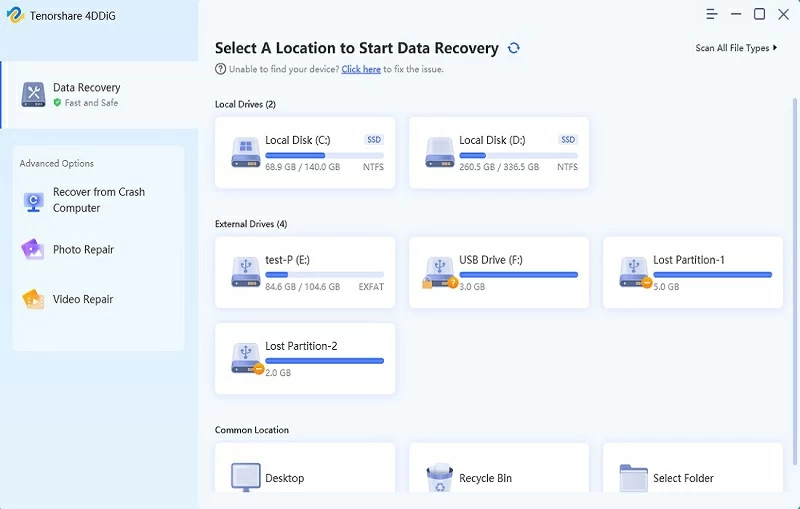
Advantages of Geekersoft Data Recovery (Mac):
- It provides all-round scanning and in-depth scanning functions to ensure the comprehensiveness and accuracy of data recovery.
- Support thumbnail display and preview functions for lost files, facilitating users to quickly locate the required files.
- It can recover over 1,000 types of files for free in various situations, meeting users' diverse needs.
- It features an intuitive and user-friendly interface design, lowering the operational threshold for users.
- It is perfectly compatible with the latest Mac devices that support Apple chips, ensuring the stability and efficiency of software operation.
- It is equipped with patented technology for restoring large video files, providing strong support for professional users.
Disadvantages of Geekersoft Data Recovery (Mac):
- The scanning speed needs to be further improved to reduce the waiting time for users.
- There are certain restrictions when restoring Mac files for free, and users need to weigh them based on their actual situation.
- To recover permanently deleted files on your Mac, with the help of Geekersoft Data Recovery (Mac), you only need to complete the following steps:
Step 1 On your Mac, install and start Geekersoft Data Recovery (Mac).
Step 2 After selecting the location where you want to retrieve the data, Geekersoft Data Recovery (Mac) will automatically start scanning for lost or deleted data.
Step 3 After the scan is completed, preview the files found by Geekersoft Data Recovery (Mac), select the files you want to save, and click the "Recover" button. Then, you can recover the deleted files on your Mac.
In addition, Geekersoft Data Recovery (Mac) offers professional and reliable 24x7 customer support, aiming to meet users' data recovery needs. Whether users prefer real-time chat, email or phone support, the support team of Geekersoft Data Recovery (Mac) is always on standby to help users solve any problems or answer any questions.
Mac Free Any Data Recovery is a professional data recovery tool, which has the ability to deeply mine and recover various files from damaged drives. As one of the early free data recovery software programs that offered users a free trial experience, it provided users with a rare opportunity to experience the full version of the software for free. This data recovery software is easy to operate. By providing two scanning modes, fast and in-depth, it simplifies the data recovery process, enabling users to complete data recovery tasks more easily.Features of Mac Free Any Data RecoveryA:
With this free data recovery software for Mac, users can recover various common file types, including but not limited to photos, videos, music, emails, PDF documents, Office documents, RAR/ZIP compressed files, game files, and system data, etc.
2. This software supports Mac data recovery on Mac OS X 10.9 (Mavericks) and later versions. However, if users need to recover lost data from the Mac OS X 10.8 system, this software cannot meet the requirements.
Advantages of Mac Free Any Data Recovery:
- The software features a simple and intuitive interface design, with a clear and straightforward functional layout.
- It has extremely fast scanning and data recovery capabilities, capable of scanning storage devices within a short period of time and quickly recovering lost data.
- It supports the recovery of various types of files, covering common data formats in users' daily work and life.
Disadvantage of Mac Free Any Data Recovery:
- The software lacks a complete customer assistance and support system, which may prevent users from obtaining effective solutions and technical support in a timely manner when they encounter problems.
Cisdem Data Recovery is a data recovery tool specifically designed for Mac systems, offering users a free trial version. With this version, users can scan and recover files lost for various reasons, including hard drive crashes or damages, formatting operations, accidental deletions, improper operations, factory reset, macOS system upgrades, and virus attacks, etc.
Features of Cisdem Data Recovery:
This software offers five different recovery options, namely basic data recovery, Mac junk recovery, external drive recovery, formatted drive recovery and advanced data recovery. However, based on our actual test results, it is recommended that users directly select the "Advance-Data Recovery" option.
2. The Cisdem data recovery software is simply designed and easy to use, capable of helping users quickly recover various types of files.
Advantages of Cisdem data recovery:- This software not only has data recovery capabilities but also offers video repair functions, capable of restoring damaged video files and meeting users' diverse needs in multimedia data processing.
- It supports directly saving the recovered data to the cloud drive, providing users with a more flexible and secure data storage method.
- Before restoring files, users can view the detailed content of the files through the preview function to ensure that the restored files are what they truly need.
Disadvantages of Cisdem data recovery:
- The free version only allows users to perform file scanning and preview operations and cannot directly restore files.
- When performing data recovery operations, the recovery process will take a certain amount of time.
- Compared with other similar data recovery products, the price of Cisdem data recovery software is relatively high.
Ontrack EasyRecovery is a program with excellent user-friendliness. It can help users accurately perform Mac file recovery operations when encountering various data loss situations, especially showing remarkable recovery effects for accidentally deleted files. This software offers a free Mac file recovery version. However, this free version has a recovery limit of 1 GB. It supports users to recover lost data from Mac-based devices and can also recover deleted backup files for free from Apple Time Machine.
Features of Ontrack EasyRecovery (Mac):
Users can use the free version 15.1 of this Mac data recovery tool to recover hundreds of file types on multiple macOS systems. Supported macOS systems include macOS 11, 10.15, 10.14, 10.13, 10.12, 10.11 and earlier versions of operating systems.
2. The software is equipped with quick scan and deep scan options, which can search storage devices more efficiently. Its search scope covers internal hard disks, removable media and RAID hard disk drives.
3. Free Mac data recovery software claims to have the ability to recover lost data from encrypted or password-protected hard drives. After actual testing, this function can indeed be realized in some cases. Furthermore, similar to Wondershare Recoverit, EasyRecovery for Mac also provides a preview function for recoverable files and is capable of recovering files using the original file names.
Advantages of Ontrack EasyRecovery (Mac):
- It has the ability to scan disks to find bad blocks and can also perform S.M.A.R.T. Analysis helps users understand the health status of their disks in advance.
- It supports multiple file formats and file systems, which can meet the data recovery needs of different users in various scenarios.
Disadvantages of Ontrack EasyRecovery (Mac):
- The recovery success rate of this software is relatively low and may not meet the expectations of some users for complete data recovery.
- The software takes a relatively long time when performing data recovery operations.
Disk Drill Mac is a Mac data Recovery software with efficient data recovery capabilities. It provides a series of practical data protection functions, among which the Recovery Vault function is particularly prominent. The Recovery Vault function can effectively prevent file loss caused by accidental deletion. Like most excellent data recovery software, Disk Drill Mac allows users to preview files before recovery. This function enables users to view the content and quality of files in advance, thereby more accurately determining whether the files are what they need.Features of Disk Drill Mac:
1.Disk Drill Mac offers two options: Quick scan and Deep scan, which is consistent with many other Mac data recovery tools.
2. Drill Mac enables users to easily and quickly recover files from an empty Mac trash. This function provides an effective solution for saving important files after users mistakenly empty the trash can.
3. This software is compatible with Mac 10.8 or higher operating systems and has excellent system compatibility. At the same time, it also allows users to selectively filter files, so as to more accurately locate and restore the required data, improving the efficiency and pertinence of data recovery. However, its file type support range is relatively limited, with only 200 different file types available for data rescue through this Mac file recovery software, mainly including common types such as pictures, videos and documents.
Advantages of Disk Drill Mac:
- The software comes with the SMART disk function, which can monitor the disk status of the hardware in real time. Through this function, users can promptly understand the health status of their disks and detect potential disk failure risks in advance.
- The Recovery Vault function provides an additional protective layer for users' files, effectively reducing the impact of accidental deletion and backup failures on file security, and enhancing the reliability and stability of data.
Disadvantages of Disk Drill Mac:
The free version of Disk Drill for Mac only allows users to perform file scanning and preview operations and cannot directly restore files. If users need to restore data, they must purchase the full version of the software
- In the scanning results, the software does not display the original file names and folder paths, which increases the operation time and complexity.
iBoysoft Mac Data Recovery Free Edition is another free software that can be used to recover deleted data and lost files on Mac. With the help of this software, users can perform data recovery operations on various file formats that have been damaged due to multiple reasons such as hard disk damage, virus attacks, system errors, and power failures.Features of iBoysoft Mac Data Recovery Free Edition
1. As a free Mac data recovery tool, it is compatible with systems such as High Sierra and Mac OS 10.7, providing the possibility of data recovery for users of different Mac systems.
2. The key difference between this software and other Mac data Recovery software lies in its Bitlocker Recovery function. This feature enables users to recover Mac data from deleted or lost Bitlocker encrypted partitions. However, there are certain limitations when using this function, that is, users must provide the password for decrypting the data; otherwise, the data recovery operation cannot be completed.
3. This software is not only applicable to Apple products but also can be used for data recovery of non-Apple products.
Advantages of iBoysoft Mac Data Recovery Free Version:
- The user interface is user-friendly: The free version of iBoysoft Mac data Recovery features an easy-to-use user interface with a simple and clear operation process. Even users without a professional technical background can easily get started.
- The software offers multiple recovery options. Users can choose the most suitable recovery method based on different data loss scenarios and needs, thereby enhancing the success rate and efficiency of data recovery.
- It supports data recovery from multiple storage devices, including CF cards, iPods, USB flash drives, etc., meeting users' data recovery needs on different devices.Disadvantages of iBoysoft Mac Data Recovery Free Version:
- When conducting a deep scan, the software needs to spend a considerable amount of time conducting a comprehensive and detailed search of the storage device.
- The Raw partition recovery function needs further improvement and refinement.
Data Rescue 6 is a data recovery software specifically designed for Mac hard drives, featuring powerful data search and recovery capabilities. It can help users retrieve lost data from damaged drives and also recover data deleted from disks due to accidental operations. This software offers a free version, allowing users to recover up to 2GB of data. It also supports various scanning and recovery methods such as quick scan, deep scan, deleted file scan, and clone file recovery.
Features of Data Rescue 6:
1. When the software starts up, it offers four main options to meet the different needs of users, namely "Start File Recovery", "View Previous Scan Results", "Clone" and "Create Recovery Drive".
2. The data rescue software for Mac features a number of distinctive functions. It can restore data backups from Time Machine, providing users with a convenient way of data recovery. In addition, the software can also identify duplicate files and automatically eliminate the recovery of duplicate files, avoiding data redundancy and saving storage space.
Advantages of Data Rescue 6:
- This software adopts the same license applicable to both Windows and Mac, which means that users only need to purchase one license to use the software for data recovery on both operating systems, providing users with higher cost performance and ease of use.
- During the scanning process, the software can monitor the health status of the disk in real time. When a bad sector is detected, it will promptly issue an alarm to alert the user of possible problems with the disk, allowing the user to take timely measures to prevent further data loss.
- The software is equipped with a hexadecimal editor, which can conduct a comprehensive and in-depth analysis of the connected storage devices and view all their contents. This function is very useful for professional users, as it can help them more accurately locate and recover lost data.
- Support assembling virtual RAID arrays to repair damaged disk sets. This function holds significant value when dealing with enterprise-level data storage devices or complex disk arrays, and can effectively enhance the success rate of data recovery.
Disadvantages of Data Rescue 6:
- The scanning and recovery speed of this software is relatively slow, especially when dealing with large amounts of data or complex disk structures, the time consumption is more obvious. This may affect the user experience, especially when data needs to be restored quickly in an emergency.
- On the latest macOS system, the bootable recovery function of the software is not satisfactory. It may fail to start normally or accurately recover data. This limits the application of the software in the latest system environment and requires further optimization and improvement.
PhotoRec Data Recovery is a free data recovery tool specifically designed for Mac systems, featuring powerful data recovery capabilities and capable of handling data loss situations caused by various reasons. It has carefully designed 8 recovery modes for users, which can fully support the recovery of Mac files lost due to various common problems such as deletion, formatting, partition loss, virus attack and system crash.
Features of PhotoRec Data Recovery:
This software can recover a wide variety of data types on Mac, covering common file formats such as photos, videos, audio and emails. Particularly prominent is that the restored data will maintain its original state, ensuring the integrity and accuracy of the data and meeting users' requirements for data authenticity.
2. This software has a steep learning curve. Even experienced users generally find it difficult to use. The process of restoring Mac files using PhotoRec is similar to performing operations through the computer command line, and this operation method is relatively unfamiliar and complex for most users. Moreover, during the operation process, users are very likely to cause further damage to the data due to misoperation, increasing the risk of data recovery.
Advantages of PhotoRec data recovery
- PhotoRec data recovery software is completely free and available to users, and there are no restrictions during its use.
- This program is designed simply and focuses on the core function of data recovery. The software does not have too many complex and redundant functional modules, which makes it more stable and efficient during operation and enables it to concentrate resources to complete data recovery tasks.
Disadvantage of PhotoRec data recovery:
- To use this program, users need to have certain professional skills and computer knowledge. For ordinary users, due to the lack of relevant professional background and operational experience, it is difficult to smoothly use this software for data recovery.
Stellar Phoenix data recovery software can be regarded as a leader in the field of Mac data recovery and is one of the ideal tools for users to retrieve deleted or lost files from Mac devices.Features of Stellar Phoenix Data Recovery:
1. This software offers a rich variety of recovery functions, which can meet the data recovery needs of different users in various scenarios. Whether data loss is caused by accidental deletion, formatting, partition loss, virus attack or system crash, Stellar Phoenix data recovery software can provide corresponding solutions to help users recover lost data as much as possible.
2. It has powerful disk testing and cloning capabilities. The disk testing function can conduct a comprehensive inspection of storage devices, helping users promptly identify potential issues with disks, such as bad sectors and logical errors, and providing a guarantee for the secure recovery of data. The disk cloning function, on the other hand, enables users to create a complete copy of the disk, providing an additional layer of security for data recovery operations without affecting the original data, and preventing further data loss due to operational errors.
- Advantage of Stellar Phoenix data Recovery:
- Provide 24/7 uninterrupted customer support services.
Disadvantages of Stellar Phoenix data recovery:
- The software does not automatically display deleted files during operation. Users need to manually make relevant Settings or perform operations to view the list of deleted files.
- In a multi-display environment, the software's support performance is poor. There may be problems such as abnormal interface display and inconvenient operation, which will affect the user experience.
Lazesoft Data Recovery software is one of the truly free Mac data recovery tools on the current market and has the ability to provide data recovery services for the OS X operating system. With the help of this software, users can scan and restore the required data without being restricted by the amount of data.
Features of Lazesoft Data Recovery:
1. This software supports data recovery from various storage media, including resized partitions, formatted hard disk drives, memory cards, and devices such as iPods. This provides users with diverse recovery approaches when they encounter data loss in different scenarios.
2. It can run on multiple file systems such as Mac HFS, HFS+, FAT and NTFS, and recover various common file types including photos, videos, music, documents and applications, meeting users' needs for recovering different types of data in daily life and work.
Advantages of Lazesoft Data Recovery:
- For non-commercial usage scenarios, Lazesoft's data recovery software is completely free and open. Users can enjoy the data recovery services it provides without paying any fees, significantly reducing their usage costs.
- This program does not require users to have advanced technical knowledge. Its simple and easy-to-understand operation interface and process design make it easy for even users who are new to data recovery to get started and quickly complete data scanning and recovery operations.
Disadvantages of Lazesoft Data Recovery:
- During the data scanning and recovery process, the software cannot pause the current operation and resume it later, which causes inconvenience to users.
- The interface design of the software is rather outdated and requires a major upgrade to enhance the user experience.
- The device recognition mechanism is not perfect. The program needs to be restarted to recognize the device.
Q1 How to choose Mac data recovery software:
After testing and reviewing 10 of the best free Mac data recovery software, the key attributes that a powerful software should possess have been identified:
- Support for multiple file types: The data types and formats used in daily life are diverse. The software needs to be capable of recovering almost all types of data, including photos, videos, music, audio, and Office documents.
- It is applicable to various data loss situations: The reasons for data loss are diverse, such as accidental deletion, virus attack, empting the Mac trash, hard disk damage, formatting and partition loss, etc. The software should be able to handle all kinds of situations.
- Support multiple devices: digital cameras, Mac computers, external hard drives, mobile phones, flash drives and other devices are used to save and protect data. The software needs to support data recovery for these devices.
- The interface is simple and easy to use: Not everyone is an expert in computer algorithms or data recovery technology. The ideal Mac data recovery program should be user-friendly.
- Truly free: Not all free software can recover files for free. Software that only offers free scanning and preview functions is not truly free.
Q2 How to recover permanently deleted files from a Mac without software?
Under normal circumstances, it is almost impossible to recover permanently deleted files on a Mac without applicable software. However, if the file has not been permanently deleted, you can try to restore it using the terminal. The specific steps are as follows:
Open the terminal;
Type "cd.trash";
Type "mv xxx..." "/", replace "xxx" with the deleted file name and press Enter;
Open Finder, search by name, and deleted files will be displayed.
All the above-mentioned free Mac data recovery software can help recover lost data. Among them, Geekersoft Data Recovery (Mac), due to its advanced algorithm, has become the best choice for Mac data recovery software. If you are looking for a simple, secure and highly successful Mac data recovery software, you might as well give Geekersoft Data Recovery (Mac) a try.