- Data Recovery
- Data Recovery for PC
- Data Recovery for Android
- Data Recovery for iPhone/iPad
- Unlock For Android
- Unlock for iPhone/iPad
- Android System Repair
- iPhone/iPad System Repair

Updated By Soha On Dec 11, 2025, 8:56 pm
Text messaging is one of the most familiar communication methods for smartphone users. However, have you ever encountered a situation where key information saved in your phone in the form of text messages was lost or accidentally deleted? If you are currently facing a situation where a key text message has been deleted or disappeared, then you mustn't miss this article. We will introduce to you how to recover deleted messages on your OnePlus phone. These methods are also applicable to mobile phones of other brands.
For you who deleted text messages on the One Plus device and have no backup data available, choosing Geekersoft Android Data Recovery is a good option. This data recovery software enables users to recover various types of data lost for various reasons in various scenarios without backups. The Geekersoft Android Data Recovery software is available in both Android and iOS versions. If you are using a OnePlus phone, Geekersoft Android Data Recovery (Android version) can recover deleted data and files on your device, including text messages, videos, audio, contacts, etc., as well as blocked Android text messages. Of course, you can also use it for data extraction and data backup, which is very practical. It should be noted that when you realize data loss, please stop using the device immediately.
It's very simple to recover deleted text messages from a OnePlus phone using Geekersoft Android Data Recovery (Android version). You just need to follow the steps below and click the mouse to achieve it.
Step 1 Install and launch Geekersoft Android Data Recovery on your PC. Connect your OnePlus device to your computer via a USB data cable.
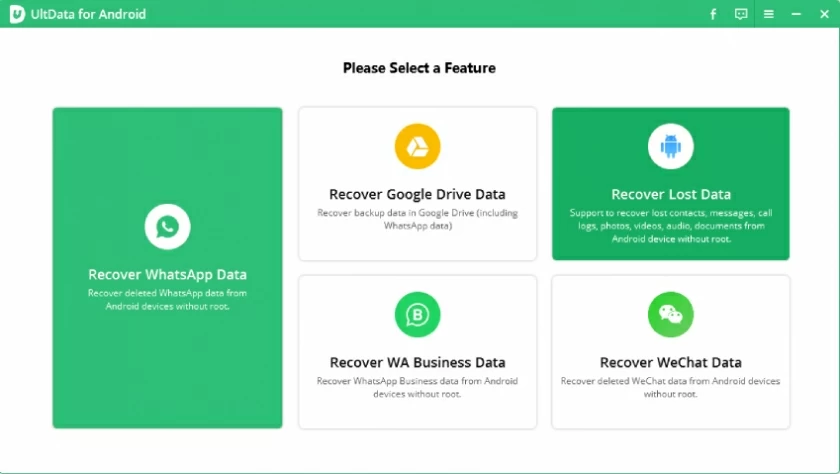
Step 2 Select the Android data recovery mode as prompted, then choose the type of data you need to recover, such as text messages, and click the "Next" button.
Step 3 The software will automatically scan your device for you. After the scan is completed, you will see a list of deleted text messages that can be recovered. Preview and select the text messages you want to restore, then click the "Restore" button. The deleted data downloaded on your OnePlus device will be restored.
The prerequisite for this method is that the backup function in your OnePlus phone has been enabled. When you activate the backup function, all information on your OnePlus device will be backed up, including text messages and other data. If you find that a text message has disappeared or been accidentally deleted, you can restore it through a backup. The operation is very simple. However, this method may result in the loss of new data. Please use it with caution.
Step 1 Launch your OnePlus phone. Click the "Settings" > "System" > "Backup" option, and then you will see the local backup of your Android device.
Step 2 Access the backup option and select the backup containing the deleted text messages for restoration. Then the system will automatically restore all deleted text messages on your OnePlus device.
In addition to restoring text messages through the built-in backup function in OnePlus phones, if you use Google Drive to back up your OnePlus phone, Google Drive backup can also help you retrieve accidentally deleted text messages. Log in to your Google Drive account and regularly back up various types of data in your OnePlus phone, including text messages, documents, pictures, videos, contacts, etc. When you find that your data is lost, access it with your PC or OnePlus phone, and then follow the steps below to restore the deleted text messages.
Step 1 Open the Play Store on your device, type "Google Drive" in the search box, and then click the Search button. After searching for the application, gently touch the "Install" button displayed on the screen. Once the installation is complete, launch this application.
Step 2 After the application is launched, it will automatically redirect to its operation interface. Click on an icon shaped like "three horizontal lines" to open the option Settings of Google Drive.
Step 3 In the pop-up option list, find and click on the "Backup" option. After clicking, select "SMS" file backup from the recoverable data list, and you can restore deleted messages on your OnePlus phone.
In OnePlus devices, you can install the SMS Backup and recovery app specifically for backing up SMS and call records. When you find that a text message has been deleted or disappeared, you can restore it through this application. The specific operation is as follows.
Step 1 Open the Play Store on your device, type "SMS Backup and Recovery" in the search box, click on the app, and then follow the prompts to install it.
Step 2 After the installation is completed, start this application. Then click on an icon in the style of "three horizontal lines", and then click "Backup".
Step 3 During subsequent use, if data loss is found, click the "Restore" button to recover the deleted data from the backup file. At this point, you will see a list of data available for recovery. Browse and select the specific data that needs to be retrieved from the backup file. Finally, just click "Restore".
The above are several methods we have introduced to you for recovering deleted or disappeared text messages on your OnePlus device. You can choose according to your own situation. If you are facing a situation where there is no backup data available, then Geekersoft Android Data Recovery is your best choice. It enables users to restore various types of data without backups, which is very useful.