- Data Recovery
- Data Recovery for PC
- Data Recovery for Android
- Data Recovery for iPhone/iPad
- Unlock For Android
- Unlock for iPhone/iPad
- Android System Repair
- iPhone/iPad System Repair

Updated By Tom On May 25, 2026, 9:42 pm
If you accidentally forget the password of your iPhone, don't panic! This situation occurs from time to time among many iOS users. This article will provide you with a detailed introduction to the solutions for bypassing iPhone passwords.
Geekersoft iOS Unlocker is an application that combines security and ease of use. It can help users bypass the locked screen of their iPhone in just a few minutes. After bypassing, users only need to reset the phone lock screen to be able to use the device normally. Not only that, it can also be used to solve many other problems related to the iPhone. Geekersoft iOS Unlocker is compatible with almost all iOS devices on the market and can run stably on all major iOS versions.
However, using this tool to bypass the iPhone password will clear all the data in the phone. Therefore, please use it with caution. Also, it is recommended that you back up your data before using it.
Geekersoft iOS Unlocker has a simple and user-friendly interface. You can easily solve problems with just a click of the mouse. Next, we will introduce to you in detail the steps to unlock and restore your phone using Geekersoft iOS Unlocker:
Step 1 Install and startGeekersoft iOS Unlockeron your Mac or Windows system. And click the Screen Unlock option to start the program that bypasses the iPhone's screen lock.
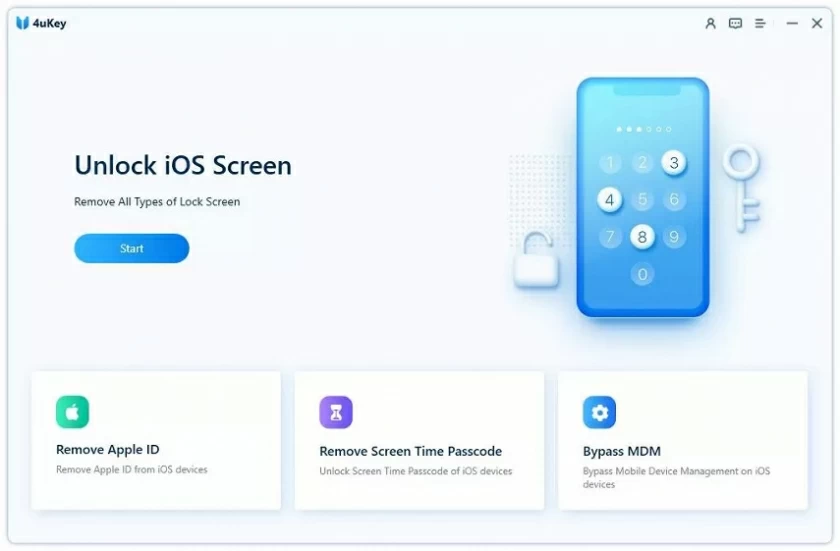
Step 2 Connect your iPhone to the system using a data cable. The software will automatically detect the device. When you are ready to start the unlocking operation, click the Unlock iOS Screen button.
Step 3 After the device is detected, activate the iPhone to DFU mode according to the prompts. Then provide the basic information about iOS devices in the pop-up window. For example, device model, firmware version, etc. After filling it out, click the Download button to get the firmware update for your phone.
Step 4 Please wait patiently for a moment. The application will automatically download the firmware update for your phone. After the download is complete, click the Unlock Now button. According to the on-screen prompts, enter the confirmation code to start the unlocking process.
After the unlocking process is completed, you will see that the iPhone is unlocked successfully. Then you can regain full control of the iPhone.
If your device is running from iOS 8.0 to iOS 10.1, it is possible to bypass the lock screen interface of the iPhone with the help of Siri. It should be noted that this is not an absolutely safe way to break through the phone's lock screen, but its advantage lies in the fact that no existing data on the device will be restored or deleted throughout the process. The following is a detailed introduction to the operation steps for you.
Step 1 Long press the home button on your phone to activate Siri, and then ask Siri for the current time. For example, you can say, "Hey Siri, what time is it now?" After waiting for Siri's reply, click on the clock icon displayed on the screen.
Step 2 On the opened world clock interface, select Add another clock.
Step 3 The interface for adding the clock will prompt you to search for the location you want to set. At this point, randomly enter some content in the search TAB, and then Select this content. The system will provide you with multiple operation options. Click on the "Select all" text among them. Then some new options will appear. Find and click the "Share" button among these options to continue the subsequent operations.
Step 4 Then select the "Message Content" application, randomly enter some content in the "To" (Recipient) field, and then click the "return" key on the keyboard.
Step 5 Highlight the text and click Add icon. You will enter another interface for adding new contacts. In this interface, click the "Create New Contact" option.
Step 6 After entering the interface for creating a new contact, click on the photo icon and then select the "Select Photo" option. After clicking "Select Photo", the photo library on the mobile phone will open. Browse the photos in the album. You can also wait for a moment.
Step 7 In the photo library interface, press the Home button. If everything goes smoothly, you will successfully enter the home screen of your mobile phone.
In addition to the methods mentioned earlier, using iTunes to restore the iPhone and bypass the password is also a relatively common approach. However, it should be made clear that even if this method can bypass the iPhone password, it will clear all the data on your device. However, if you have already backed up the data, then after completing the iPhone password bypass operation, you can choose to restore these backup data. Next, we will introduce the operation steps to you in detail:
Step 1 Launch the iTunes software on your computer, and then connect your iPhone to the computer using a USB data cable.
Step 2 Press and hold the Home button on your iPhone. While holding it down continuously, connect your iPhone to your computer. At this point, a "connect-to-iTunes" symbol will be displayed on the iPhone screen, indicating that the device has entered the recovery mode.
Step 3 After successfully connecting your iPhone to your computer, iTunes will automatically recognize the device. Click the Restore button in the prompt message to start the restoration operation.
Step 4 If you already have backup data, you can choose to restore the contents of your phone from the backup. In iTunes, find the device summary section and then click the Restore Backup button.
Step 5 In the pop-up confirmation message, click the Agree option. After that, iTunes will delete all the content on the mobile phone and restore the data according to the selected backup.
There are still some forensic toolkits in the industry that can help users easily bypass iPhone passwords. Among them, Elcomsoft iOS Forensic Toolkit is a rather reliable choice. After downloading the licensed version from its official website, simply connect your iPhone to the computer system via a data cable and then run the forensics tool. In the welcome interface of the tool, select the "Get Password" option. After selection, the tool will run a specific encryption command and send a password that can be used for unlocking to your phone.
The above are several methods we have introduced to you to smoothly bypass the iPhone lock screen. You can choose the most suitable method for yourself according to your own needs, and then follow the steps to perform the iPhone password bypass operation. Among them, Geekersoft iOS Unlocker is the choice of most users because it has extremely high security. It can not only help you bypass iPhone passwords but also assist you in solving various problems related to the iOS system.